| Title | Signal Private Messenger |
| Version | 6.2.3 |
| Price | Free |
| Category | Common |
| Package | org.thoughtcrime.securesms |
In an era where digital privacy is constantly under threat, finding a messaging app that truly prioritizes your security without sacrificing usability is rare. Signal Private Messenger, developed by the Signal Foundation, stands as the gold standard for private communication. Unlike many mainstream messaging platforms that monetize your conversations or collect metadata for advertising, Signal is built around a single principle: your private life should stay private. Every message, call, and shared file is protected by state-of-the-art end-to-end encryption, meaning only you and the person you’re communicating with can read or listen to it—not even Signal itself has access. The app is open source, independently audited, and completely free, with no ads, no trackers, and no hidden fees. Whether you’re sending a quick text, making a voice call, or hosting a group video chat, Signal ensures that your data remains yours. And because it’s cross-platform, you can seamlessly switch between your phone and desktop without compromising security. If you value genuine privacy in your daily conversations, Signal Private Messenger is the definitive choice.
Key Features
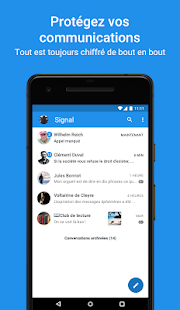
- End-to-End Encryption for Everything – Signal’s encryption protocol is the gold standard used by security experts worldwide. Every message, media file, voice call, and video call is encrypted from sender to recipient. Not even Signal can decrypt your communications, ensuring that your conversations remain truly private, whether you’re chatting one-on-one or in a large group.
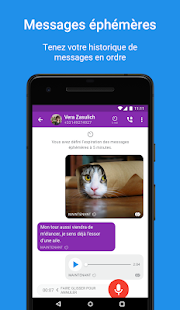
- Disappearing Messages – Take control of your digital footprint by setting messages to automatically vanish after a chosen period of time—from 5 seconds to 4 weeks. This feature is perfect for sensitive conversations or simply reducing clutter. The timer applies to both text and media, and you’ll get an alert if a recipient takes a screenshot, adding an extra layer of accountability.
- Open Source and Independently Audited – The entire Signal codebase is open source, meaning anyone can inspect it for vulnerabilities, backdoors, or privacy violations. The app undergoes regular independent security audits by leading firms. This transparency ensures that the privacy promises are not just marketing claims but verifiable facts, earning Signal the trust of journalists, activists, and security researchers.
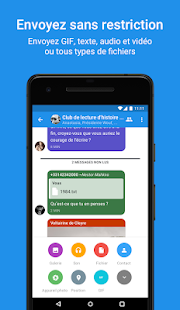
- Private Group Chats with Advanced Controls – Create encrypted group chats for up to 1,000 members. Group admins can approve or deny new members, and all messages within the group remain end-to-end encrypted. You can also enable admin-only messaging to prevent chaos. Disappearing messages work in groups too, making Signal ideal for both casual friend groups and professional teams handling confidential information.
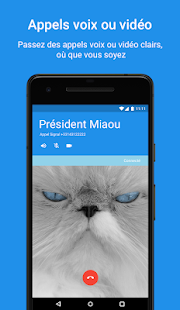
- Voice and Video Calls Encrypted – Signal offers high-quality voice and video calls that are secured with the same end-to-end encryption as your texts. Unlike other apps that may downgrade encryption for calls, Signal treats every call as a private line. The app uses adaptive bandwidth to maintain clarity even on slower connections, and you can switch between Wi-Fi and mobile data without dropping the call.
- Minimal Data Collection – No Ads, No Trackers – Signal collects only the absolute minimum information required to provide the service—your phone number and a registration code. It does not collect metadata like your contacts list, location, IP address, or profile information. There are no third-party analytics, no ad networks, and no data sold to marketers. Signal’s business model is donations, not data.
- Screen Security and Sealing – For added privacy, you can enable a “Screen Security” option that prevents the app’s content from being visible in your recent apps switcher and blocks screenshots from being taken inside the app on supported devices. This is especially useful when you’re using Signal in public or sharing your device. You can also lock the app with your phone’s biometric or PIN.
Why Choose Signal Over Other Messengers?
In a crowded messaging market, Signal differentiates itself by putting privacy first without making you jump through hoops. Most popular apps claim to encrypt your messages, but many still collect extensive metadata—who you talk to, when, for how long, and from where—which can be just as revealing as the content itself. Signal collects virtually no metadata. Even your profile name is stored only on your device and shared with contacts through end-to-end encryption. The app is developed by the Signal Foundation, a nonprofit organization funded entirely by donations, not venture capital or advertising. This independence means Signal has no incentive to weaken your privacy for profit. The app’s simple, clean interface makes it easy for anyone to use, from tech novices to security professionals. And because Signal is open source, the security community continuously reviews and improves it. When you choose Signal, you are not just downloading another app—you are joining a movement for universal digital privacy.
How to Get the Most Out of Signal
Getting started with Signal takes only a few minutes. After downloading, you verify your phone number with a one-time code. The app will then ask for permission to access your contacts—this optional step helps you quickly find friends who already use Signal (your contacts are hashed and never leave your phone). Once set up, you can immediately start text conversations, make encrypted voice or video calls, or create a group. For an even more private experience, enable the “Disappearing Messages” timer in your chat settings. If you need to verify that no one is impersonating your contact, use the “Safety Number” feature—a unique cryptographic fingerprint that you can compare out-of-band. On Android, you can also set Signal as your default SMS app to handle both encrypted and unencrypted messages in one place (though unencrypted SMS won’t be private). To stay in touch across devices, install Signal Desktop on your Windows, Mac, or Linux computer and link it to your phone via a QR code. All messages sync seamlessly, and calls can be made from your desktop too. Remember to enable “Screen Security” in the app’s Privacy settings if you want to block screenshots and previews. Regularly check for updates—Signal rolls out new features and security improvements frequently, and you’ll always get them for free.
In a world where digital privacy is increasingly rare, Signal Private Messenger provides a simple, powerful, and trustworthy solution. It’s more than just a chat app—it’s a commitment to keeping your conversations between you and the people you trust. No data mining, no ads, no compromises. By choosing Signal, you’re taking a stand for your rights while enjoying a seamless, feature-rich communication experience. Download Signal Private Messenger today and experience true private communication. Your conversations deserve nothing less.