| Title | Google Home |
| Version | Varies with device |
| Price | Free |
| Category | Common |
| Package | com.google.android.apps.chromecast.app |
Imagine walking through your front door and your home automatically greets you with your favorite playlist, the lights dim to a cozy warm tone, and the thermostat adjusts to your preferred temperature—all without lifting a finger. This seamless, intuitive experience is exactly what the Google Home app delivers. Designed by Google LLC, this powerful lifestyle companion transforms your Android device into a central hub for managing your entire smart home ecosystem. Whether you’re setting up a new Google Nest speaker, casting a movie from your phone to your TV via Chromecast, or creating a morning routine that syncs your lights, news, and coffee maker, the Google Home app makes it effortless. With a clean, user-friendly interface, it connects all your compatible devices—from smart lights and thermostats to locks, cameras, and more—into one cohesive system. No more juggling multiple apps or remembering different voice commands. Just open Google Home, and you’re in control. It’s not just about convenience; it’s about creating a home that adapts to your lifestyle, saving you time, energy, and even money. Ready to unlock the full potential of your smart devices? Let’s dive into what makes this app an essential tool for modern living.
Key Features
- Unified Device Management: Add, organize, and control all your smart home devices—lights, thermostats, cameras, speakers, and more—from a single dashboard. The app automatically discovers compatible devices on your Wi-Fi network and guides you through setup in minutes.
- Custom Routines for Every Moment: Create personalized automations that trigger multiple actions with a single tap or voice command. For example, a “Good Morning” routine can turn on the lights, start the coffee maker, play the news, and adjust the thermostat—all at once.
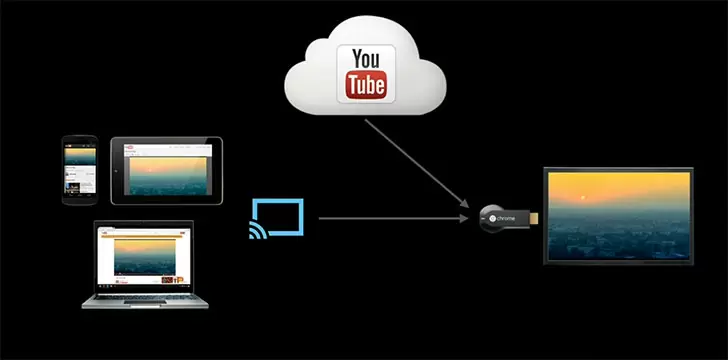
- Seamless Casting & Streaming: Cast your favorite shows, music, or photos from your phone to any Chromecast-enabled TV or speaker. You can also use the app as a remote for your Google TV or Nest Audio, controlling playback, volume, and inputs without hunting for the physical remote.
- Advanced Google Assistant Integration: Your devices respond to voice commands via the Assistant, but the app gives you deeper controls—like setting up voice match so each family member gets personalized results, or tweaking assistant settings for your specific devices.
- Home Away from Home: Monitor your home from anywhere with live camera feeds, motion alerts, and doorbell notifications. You can check if you left the garage door open, receive package delivery alerts, or even let in a guest remotely—all from the app.
- Intelligent Energy & Safety Features: View energy usage insights for compatible thermostats and appliances, set schedules to save power, and receive smoke or carbon monoxide alerts from Nest Protect. The app also notifies you of unusual activity, like a window left open in the rain.
- Multi-User & Guest Access: Invite family members or roommates to control the home, assigning different permissions. You can also create temporary guest access for house sitters or service providers, ensuring security without sharing your passwords.
Why Choose Google Home Over Other Smart Home Apps?
There are many smart home apps out there, but Google Home stands apart because it’s built on the foundation of Google’s ecosystem—meaning it integrates natively with services you already use, like Google Calendar, YouTube, and Google Photos. This deep integration allows for context-aware automations: imagine your lights gradually brightening as your morning alarm goes off, or your TV automatically pausing when you answer a video call. Additionally, the app is constantly updated with new features and device support, ensuring it remains compatible with the latest smart home products from hundreds of brands, including Philips Hue, TP-Link, Samsung, and more. What’s more, the app’s setup wizard is famously straightforward—even if you’re not tech-savvy, you’ll have your first device connected in under five minutes. And because it’s developed by Google, you can trust that your data is handled with industry-leading security and privacy. In short, Google Home isn’t just a remote control for your gadgets; it’s the brain that makes your home smarter, more responsive, and more personalized.
How to Use the Google Home App: A Quick Start Guide
Getting started with Google Home is as simple as downloading the app and following the on-screen prompts. Begin by opening the app and signing in with your Google account. The app will automatically scan your Wi-Fi network for any compatible devices—just tap on each one to add it. For devices that require manual setup, such as some smart plugs or bulbs, the app provides step-by-step instructions with animated illustrations. Once your devices are added, you can organize them into rooms (e.g., Living Room, Kitchen) for easy control. Next, explore the “Routines” tab to create your first automation: tap “+” and choose a trigger (like “When I say ‘Goodnight’”) and then add actions (turn off lights, lock doors, set thermostat). You can also set schedules or use sensor triggers if you have compatible motion or contact sensors. To cast content, simply tap the Cast icon (a rectangle with a Wi-Fi signal) within a supported app like YouTube or Spotify, and select your Chromecast or Nest device. For advanced control, dive into the “Settings” menu (gear icon) to tweak device names, adjust privacy settings, link third-party services (like IFTTT or Alexa), or manage family members. The app also includes a help center with troubleshooting guides and community forums—perfect for when you want to explore more advanced automations.
Pro Tips & Tricks to Supercharge Your Experience
Once you’re comfortable with the basics, these tips will help you get even more out of Google Home. Voice-Controlled Shopping Lists: Link your Google Assistant to Keep or a third-party list app, then just say “Hey Google, add milk to my shopping list”—it will appear instantly in Google Home’s “Shopping List” tab. Broadcast to All Speakers: Need to call the family to dinner? Go to the app’s “Broadcast” feature (or say “Hey Google, broadcast dinner is ready”) and your message will play on every Google Home speaker in the house. Customize Night Mode on Nest Hubs: If you have a Nest Hub with voice match, you can set a night mode that dims the screen and reduces voice responses to a whisper—perfect for checking the time without waking your partner. Use “Scenes” for Multiple Actions Without a Trigger: In the Routines section, you can create a “Scene” that you fire manually by tapping a button on your phone’s home screen widget. For example, a “Movie Night” scene that dims lights, closes blinds, and starts your projector. Enable “Seamless Streaming” for Auto-Resume: If you’re listening to music on a speaker and move to another room, enable seamless streaming in settings—your music will automatically transfer to the nearest speaker as you go. Control with Wear OS: If you have a Wear OS smartwatch, you can control devices directly from your wrist using the Google Home app for watch—great for quick toggles when your phone is out of reach. Finally, don’t forget to regularly update the app to get the latest features and device compatibility—Google rolls out improvements every few weeks. With these tricks, you’ll transform your home into a truly responsive, intuitive space.
In a world where our time and attention are limited, the Google Home app gives you the power to automate the mundane and focus on what matters most. It’s not just about controlling devices; it’s about crafting a home environment that anticipates your needs, enhances your comfort, and keeps you connected with your family—all from the palm of your hand. Whether you’re a smart home enthusiast looking to fine-tune every detail, or a casual user who just wants a simpler way to turn off the lights, this app delivers a polished, reliable experience that grows with your setup. Download Google Home today and take the first step toward a smarter, more harmonious home. Your future self will thank you.