| Title | Compass |
| Version | 1.4.9 |
| Price | Free |
| Category | Common |
| Package | app.melon.icompass |
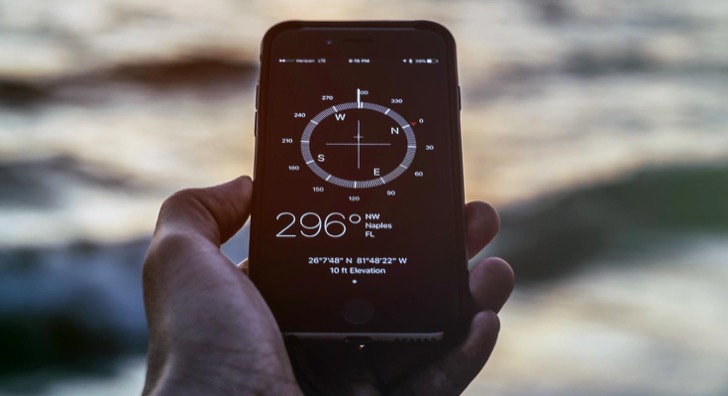
Discover the world with confidence using Compass by melon soft, a sleek and highly accurate digital navigation tool that transforms your Android device into a reliable magnetic compass and location assistant. Whether you’re trekking through remote backcountry, finding your bearings in a new city, exploring nature trails, or simply need to know which way is north while setting up camp, this app delivers precise directional data and essential geographic information in a clean, intuitive interface. Combining classic compass functionality with modern sensor technology, Compass goes beyond a simple arrow—it shows your real-time heading in degrees and cardinal directions, displays your exact geographic coordinates and altitude, and even helps you follow a straight path with a handy sighting mode. No clutter, no complex menus, just the tools you need to stay oriented wherever life takes you.
Key Features
- Instant Magnetic Compass – Harness your phone’s built-in magnetometer to get a true-to-life compass reading. The large, easy-to-read dial shows precise heading in degrees and clear cardinal points (N, NE, E, SE, S, SW, W, NW) so you always know your direction at a glance.
- True North & Magnetic Declination – Choose between true north and magnetic north with automatic declination adjustment based on your location. Perfect for map navigation, geocaching, and professional use where geodetic accuracy matters.
- GPS Coordinates & Altitude – View your live latitude, longitude, and elevation derived from satellite signals. Instantly share your exact position with friends or record waypoints for later reference—no separate GPS app needed.
- Background Calibration & Sensor Status – The app continuously monitors sensor health and prompts simple calibration when needed, ensuring maximum accuracy. A built-in sensor strength indicator shows when magnetic interference might affect readings, so you can step away from metal objects or electronic gear.
- Night Mode & Display Options – Choose from several distinct compass face styles, including a low‑light night mode that conserves battery and preserves your night vision. Adjust brightness or keep the screen awake for prolonged use during hikes or night expeditions.
- Direction Lock & Sighting Mode – Tap to lock your current bearing, then align your phone with a distant landmark to walk in a straight line. The sighting overlay helps you stay on course through dense forest, open water, or featureless terrain.
- Minimalist, Ad‑Free Experience – Enjoy an uncluttered design without intrusive advertisements. The interface puts the compass front and center, while elegant animations and fluid responsiveness make every interaction feel natural.
Why Choose Compass by melon soft
In a sea of navigation apps, Compass stands out by focusing on what a compass should do best—give you an instant, dependable reading without unnecessary distractions. We designed every pixel with clarity and practicality in mind. The app starts up in a split second, requires no mandatory account sign‑up, and works entirely offline, so you can rely on it deep in the wilderness where cellular networks can’t reach. Because it leverages raw sensor data directly from your device, the accuracy rivals that of standalone handheld compasses, provided you follow the simple calibration instructions. Regular updates fine‑tune the algorithms that filter out magnetic noise, meaning you get a stable needle even when your hands shake slightly or you’re surrounded by small metal objects.
Reliability under real‑world conditions is our priority. The app’s declination engine uses the World Magnetic Model to automatically compute the offset between magnetic and true north based on your GPS position, eliminating guesswork. For outdoor professionals, surveyors, or orienteering enthusiasts, this level of detail can make a critical difference. Plus, the built‑in coordinate reader and altitude display turn your phone into a handy field tool for documenting trail junctions, marking fishing spots, or even geotagging nature photography. Everything is integrated seamlessly, so you never have to switch between multiple apps.
Moreover,Compass respects your privacy and device resources. It does not collect personal location data, does not run in the background draining your battery, and is engineered to be lightweight. The result is a premium‑feeling navigation companion that performs beautifully on everything from flagship phones to modest, older devices.
How to Use Compass for Best Results
To get the most accurate readings, start by calibrating your device’s sensors. Open the app and follow the on‑screen figure‑eight motion prompt if it appears—this helps the magnetometer recalibrate and compensates for any magnetic interference. Once calibration is complete, hold your phone flat in your palm or on a level surface, as tilting can skew the compass dial. If you need to read a bearing while holding the phone upright, activate the sighting mode from the main screen. In this mode, align the central marker with a distant object and the displayed heading will point to that landmark, allowing you to walk confidently in that direction.
For outdoor navigation with a paper map or a topographic app, switch to true north mode in the settings menu. This ensures that your compass readings align perfectly with the meridians on your map. The GPS coordinates update in real time as you move, so you can cross‑reference your position on a paper chart or share your location via text or messaging apps by tapping the coordinate field. If you’re hiking after sunset, activate night mode to reduce glare and preserve your dark‑adapted eyes. Remember to keep the phone away from large metal structures and powerful magnets to avoid erratic needle movement; the app’s sensor status icon will warn you when external interference is high.
Tips and Tricks for Everyday Use
Beyond traditional hiking and camping, Compass can be surprisingly useful in daily life. Use it to orient your solar panel for maximum sunlight exposure by pointing the panel south (in the northern hemisphere) or north (in the southern hemisphere). When apartment hunting, check which way the windows face to understand natural light throughout the day. Photographers can predict golden hour angles by noting the sun’s direction relative to a subject. Even something as simple as hanging a satellite dish becomes easier when you know the precise bearing to a satellite. The app’s direction lock feature also serves as a straight‑line guide for lining up furniture, garden beds, or artwork. The possibilities extend far beyond the trailhead.
Simple, precise, and built for everyone who values direction, Compass by melon soft is your dependable partner for outdoor adventures and everyday orientation tasks. Take control of your bearings and explore the world with renewed assurance.