| Title | SiriusXM: Music, Sports & News |
| Version | Varies with device |
| Price | Free |
| Category | Common |
| Package | com.sirius |
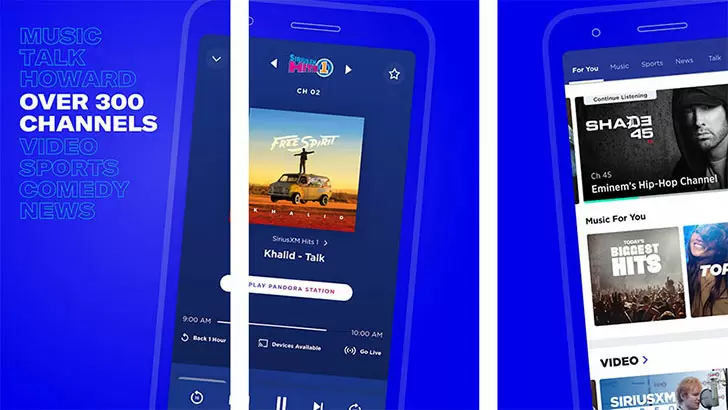
SiriusXM: Music, Sports & News brings the power of satellite radio to your Android device, transforming your phone into a portable entertainment hub. Whether you're commuting, working out, or relaxing at home, this app gives you instant access to hundreds of channels spanning every genre imaginable. From commercial-free music and live sports play-by-play to breaking news, exclusive talk shows, and celebrity-hosted programs, SiriusXM offers a listening experience that ordinary streaming services simply can't match. With the ability to listen live or catch up on demand, you can curate your own audio journey without ever missing a beat. The app is designed to work seamlessly on both mobile data and Wi-Fi, and it includes smart features like personalized stations, offline downloads, and easy integration with your car's infotainment system via Android Auto. Whether you're a longtime subscriber or considering a free trial, this description will walk you through everything that makes SiriusXM a must‑have for music lovers, sports fans, news junkies, and talk radio enthusiasts alike.
Key Features
- 400+ Channels of Live & On-Demand Content – Explore an extensive lineup that includes every major music genre, from rock, hip-hop, and country to classical, jazz, and Latin. Plus, dive into 24/7 sports coverage from the NFL, NBA, MLB, NHL, college sports, and more. News channels like CNN, Fox News, MSNBC, and BBC are available, along with exclusive talk shows hosted by Howard Stern, Andy Cohen, and many others.
- Personalized Music & Comedy Stations – Create custom radio stations based on your favorite artists or songs. The app tailors music and comedy channels to your taste, mixing familiar hits with discoveries you'll love. You can also thumbs up or down tracks to refine your listening experience.
- On-Demand Episodes & Replays – Missed a live show? No problem. Access thousands of on‑demand episodes, including full music sets, sports replays, talk show archives, and exclusive concert recordings. Listen whenever you want, as many times as you want.
- Offline Mode for Unlimited Downloading – Save your favorite shows, music stations, and sports events to your device for offline playback. This is perfect for flights, road trips, or any time you're without a strong data connection. Downloaded content never expires as long as your subscription remains active.
- Multi-Device Streaming & Cross-Platform Continuity – Start listening on your phone, then seamlessly switch to another device like your car's SiriusXM receiver, a smart speaker, or a tablet. Your favorites, recently played, and settings sync across all devices, so you're always where you left off.
- Advanced Search & Discovery Tools – Use voice commands or the intuitive search bar to find specific channels, shows, hosts, or songs. The app also recommends new content based on your listening history, helping you uncover hidden gems in the vast SiriusXM library.
- Smart Car Integration & Parental Controls – Enjoy a safe, hands‑free listening experience with full support for Android Auto and wireless Apple CarPlay. Parents can lock explicit channels and set mature audience filters, ensuring age‑appropriate content for younger listeners in the car or at home.
Why Choose SiriusXM Over Other Music & Audio Apps?
SiriusXM stands apart because it offers live, curated content that you can't get anywhere else. Unlike algorithm-driven playlists, SiriusXM channels are programmed by expert DJs and hosts who bring passion, personality, and context to every track. You'll hear artist interviews, live concert exclusives, and behind‑the‑scenes stories. Sports fans get real‑time play‑by‑play for every major league, plus in‑depth analysis and talk shows that go beyond the highlight reels. News enthusiasts can toggle between national headlines, financial reports, weather updates, and political commentary from every perspective—all without ads on most channels.
Another unique advantage is the integration with the satellite radio experience in millions of cars. When you subscribe through the app, you unlock the same channel lineup as a traditional SiriusXM radio, but with added flexibility. You can listen on your phone, at home via a smart speaker, or even with the SiriusXM web player. The app also allows you to start a free trial instantly, so you can explore the full service before committing. And for families, the ability to create multiple profiles means everyone gets their own favorites, listening history, and offline downloads.
Finally, SiriusXM is constantly evolving. New channels and exclusive shows are added regularly—think limited series like"The Beatles Channel"or coverage of major festivals, award shows, and live events. The app's developers actively listen to user feedback, improving performance and adding requested features such as sleep timers, enhanced search, and better audio streaming quality (up to 320 kbps). If you crave a radio experience that's both personal and vast, with more than just a loop of the same 50 songs, SiriusXM delivers.
Tips & Tricks to Get the Most Out of the App
1. Master the “Favorites” Feature – Tap the star icon on any channel or show to add it to your favorites list. This creates a quick‑access menu on the home screen, so you can jump directly to your go‑to stations—whether it's"The Highway"for country music or"SiriusXM FC"for soccer talk. You can also reorder favorites by long‑pressing and dragging them into your preferred sequence.
2. Use the “Discover” Tab – The app’s dedicated discovery section highlights new releases, upcoming live events, and curated playlists you might not find on your own. Check it weekly for exclusive premieres like album listening parties or artist‑hosted shows. This is also where you'll find special themed channels during holidays or major sporting events.
3. Download Content Before Travel – Before a long flight or a road trip through areas with spotty cell coverage, open the app, pick a few shows or entire music channels, and tap the download icon. You can store up to 300 hours of offline content. Pro tip: Download a mix of music and talk shows so you always have something to match your mood.
4. Set a Sleep Timer – If you like falling asleep to talk radio or soft music, don't let your data plan get caught off guard. Use the built‑in sleep timer (found in the now‑playing screen’s menu) to automatically stop streaming after 15, 30, 45, or 60 minutes. This also saves battery life.
5. Enable “Data Saver” Mode for Longer Listening – Under App Settings, turn on Data Saver to reduce streaming quality when you're not on Wi‑Fi. You'll still get clear audio, but the app will consume significantly less mobile data. Pair this with offline downloads for the best balance of quality and economy.
6. Explore the “Sports” Section for Real‑Time Scores – Tap the sports tab to see live game scores, upcoming matchups, and direct links to the appropriate play‑by‑play channel. You can set alerts for your favorite teams, so the app will notify you when a game is about to start or when a key play happens.
7. Customize Your “For You” Feed – After listening for a few days, the app learns your preferences and serves personalized recommendations. You can fine‑tune this by rating shows with thumbs up or down. The more you interact, the more accurate your suggested content becomes—essentially building a radio station that evolves with you.
Whether you’re a devoted fan of Howard Stern, a die‑hard NFL follower, a country music aficionado, or someone who simply wants to escape the monotony of standard streaming playlists, the SiriusXM app offers an unmatched variety of live and on‑demand audio. With its rich feature set—offline support, custom stations, cross‑device syncing, and deep catalog of exclusive content—it’s more than just a radio app; it’s your all‑in‑one audio companion. Download SiriusXM: Music, Sports & News today from the Google Play Store and start your free trial. Once you experience the breadth of live, curated radio combined with the flexibility of on‑demand listening, you'll wonder how you ever got by without it.