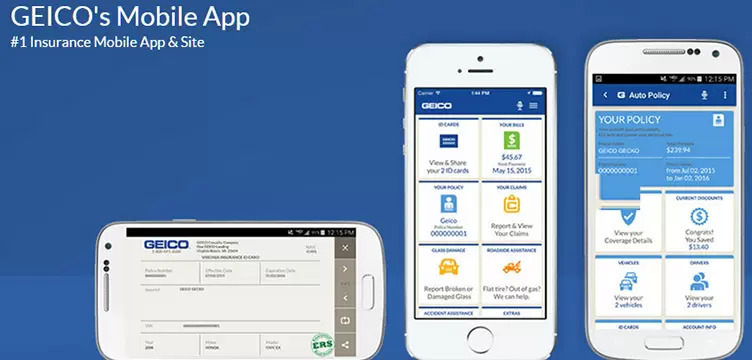
| Title | GEICO Mobile - Car Insurance |
| Version | 5.47.0 |
| Price | Free |
| Category | Common |
| Package | com.geico.mobile |
The GEICO Mobile app puts your car insurance policy right in your pocket, offering a streamlined and secure way to manage your coverage, make payments, and access roadside assistance. Designed for both existing policyholders and those shopping for a new quote, this official app from GEICO Insurance transforms how you interact with your auto insurance. With a focus on convenience, speed, and clear information, the GEICO Mobile app eliminates the need to log into a desktop website or call a customer service representative for routine tasks. Whether you need to show your digital ID card, file a claim after an accident, or just want to review your coverage details, everything is available with a few taps. The app is built with user-friendly navigation and robust security features, ensuring your personal and financial data remains protected. Beyond its core functions, the GEICO Mobile app also includes helpful tools like accident assistance guides, policy change history, and even a payment reminder system to help you avoid late fees. For anyone holding a GEICO car insurance policy, this app is an essential companion that simplifies insurance management and gives you peace of mind on the road.
Key Features
- Quick Access to Digital ID Cards: View, download, and share your proof of insurance instantly. The app stores your current ID card and any additional cards for other vehicles on your policy, making it easy to present them during a traffic stop or when renting a car.
- Effortless Policy Management: Review your coverage details, deductibles, and policy documents in one place. You can make changes to your policy, add or remove vehicles, update your address, and even change payment methods without needing to call or visit a website.
- Seamless Bill Payment: Pay your premium quickly and securely using a bank account, credit card, or debit card. The app allows you to set up automatic payments, view payment history, and schedule future payments. You can also enable push notifications for upcoming due dates.
- 24/7 Roadside Assistance: Request help immediately if you’re stranded due to a breakdown, flat tire, lockout, or need a tow. The app uses your device’s location to dispatch the nearest service provider, and you can track the arrival time of the tow truck or technician.
- Easy Claims Filing and Tracking: Start a new claim directly from the app by providing details about the accident, uploading photos, and submitting the necessary documents. You can then track the status of your claim step by step, communicate with your adjuster, and view estimated repair timelines.
- Accident Assistance Guide: A step-by-step tool that helps you know exactly what to do after an accident—from checking for injuries and calling 911 to exchanging information with the other driver and documenting the scene. The guide also includes a checklist for taking photos and gathering witness contact details.
- Secure Login with Biometrics: Protect your account with fingerprint or facial recognition login, so you can access your policy quickly without typing your username and password each time. The app also supports two-factor authentication for an extra layer of security.
Why Choose GEICO Mobile?
Managing car insurance has never been more convenient. The GEICO Mobile app consolidates every important action into a single, intuitive interface. Instead of juggling multiple websites or waiting on hold during business hours, you can handle tasks like updating your policy or filing a claim at any time, day or night. The app is particularly valuable for drivers who are always on the go—whether you’re a commuter, a road trip enthusiast, or someone who simply wants to avoid administrative hassles. GEICO’s commitment to digital innovation means the app is regularly updated with new features and improvements based on user feedback.
Security is a top priority. All data transmitted between the app and GEICO’s servers is encrypted, and your personal information is never stored on the device. The biometric login option ensures that even if your phone is lost or stolen, your insurance details remain protected. Additionally, the app allows you to set up a payment PIN for extra safety when making transactions.
Another standout advantage is the integrated roadside assistance feature. Knowing that help is just a tap away can reduce stress during an unexpected breakdown. The app displays the exact location of the service provider and gives you an estimated time of arrival, so you’re never left wondering. This level of transparency and real-time tracking is something many competing insurance apps still lack.
How to Make the Most of the GEICO Mobile App
Getting started is simple. After downloading and installing the app, you’ll need to create an online account or log in with your existing GEICO credentials. Once inside, take a few minutes to explore the dashboard. Set up your biometric login for quicker future access, and enable push notifications to receive alerts about payment due dates, claim updates, and policy changes. You can also customize your notification preferences to avoid being overwhelmed.
One of the most useful features is the digital insurance card. Instead of digging through your glove compartment for a physical card, you can show your phone to law enforcement or a rental car agent. Make sure your digital card is always up to date by syncing the app before you drive. The app also lets you email or text your ID card to someone else, which is helpful if a family member needs proof of coverage for a vehicle they’re driving.
If you’re involved in an accident, the Accident Assistance Guide walks you through the entire process. Follow the prompts to capture photos of the scene, document vehicle damage, and exchange information with the other driver(s). The guide even reminds you to call your insurance company and provides a direct link to file a claim. Using this tool can help you stay calm and organized during a stressful situation.
Finally, check the app periodically for any policy changes or renewal notices. You can also use the “My Policy” section to view your declarations page, which contains a summary of your coverage limits and deductibles. If you’re shopping for a new car, you can add a vehicle to your policy from the app and get a quote based on its VIN or model details. This makes it easy to compare coverage options before making a purchase.
Tips and Tricks for a Smooth Experience
To keep your app running smoothly, ensure you have a stable internet connection—especially when filing a claim or downloading your ID card. If you travel internationally, note that roadside assistance is only available within the United States and Canada. For users with multiple vehicles or policies, the app allows you to switch between them from the main menu, so you don’t need to log out and log back in.
Another tip: save your payment method details in the app to speed up future transactions. You can also set up automatic payments to avoid missing a due date. If you prefer manual payments, use the in-app calendar to schedule a payment for a specific day. The app will send you a reminder 24 hours before the payment is processed.
If you ever encounter a technical issue, the app has a built-in “Help” section with FAQs and troubleshooting guides. You can also contact GEICO customer support directly through the app’s chat or phone feature. Many common problems, such as login errors or missing policy information, can be resolved by clearing the app cache or updating to the latest version. Keep the app updated to benefit from the newest features and security patches.
Finally, take advantage of the app’s “Ride” feature (available in select states) that allows you to share your trip details with friends or family for safety. This is particularly useful for late-night drives or long journeys. While not a core insurance feature, it reflects GEICO’s effort to add value beyond basic policy management.
In conclusion, the GEICO Mobile app is more than just a digital wallet for your insurance card. It’s a full-service tool that puts you in control of your car insurance policy, making everyday tasks faster and emergencies less daunting. Whether you’re a long-time GEICO customer or considering switching providers, this app demonstrates how technology can simplify one of life’s necessary but often tedious responsibilities. Download it today and experience the convenience of managing your car insurance from the palm of your hand.