| Title | Amazon Kindle |
| Version | Varies with device |
| Price | Free |
| Category | Common |
| Package | com.amazon.kindle |
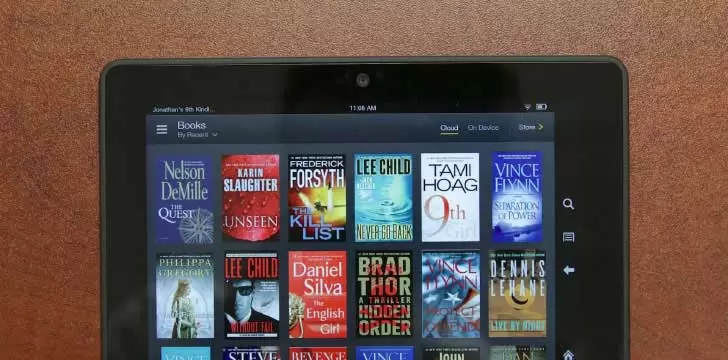
Amazon Kindle transforms your Android device into a portable library, giving you instant access to millions of books, magazines, and audiobooks wherever you go. Whether you’re a dedicated bookworm, a casual reader, or someone exploring the world of digital literature for the first time, this app makes it effortless to carry an entire bookshelf in your pocket. From chart-topping bestsellers and timeless classics to niche indie titles and exclusive Kindle Unlimited content, the Kindle app opens a universe of stories. You can customize your reading experience to suit your eyes and mood, pick up right where you left off across all your devices, and even switch between reading and listening with Whispersync for Voice. It’s more than an e-reader—it’s a complete reading companion that encourages discovery, fuels imagination, and adapts to your lifestyle.
Key Features
- Massive Selection of Titles – Choose from over six million eBooks, including new releases, bestsellers, and self-published gems through Kindle Direct Publishing. Explore thousands of audiobooks, comics, and children’s books, all from one app.
- Kindle Unlimited – Enjoy unlimited access to a rotating catalog of more than two million titles and thousands of audiobooks for a low monthly fee. From gripping thrillers to in-depth non-fiction, there’s always something new to discover without additional purchase.
- Customizable Reading Experience – Adjust font size, line spacing, margins, and background color to reduce eye strain. Switch to a warm, amber-toned dark mode for nighttime reading, or choose from a variety of fonts including Bookerly, the font designed specifically for digital reading.
- Whispersync Technology – Seamlessly sync your last page read, bookmarks, notes, and highlights across all your Kindle devices and apps. Start reading on your phone, continue on your tablet, and never lose your place.
- Built-In Dictionary and Wikipedia Lookup – Tap any word to instantly see its definition from the built-in dictionary, or dive deeper with Wikipedia entries—all without leaving the page. Enhance your vocabulary and understanding as you read.
- Smart Lookup and X-Ray – Explore the “bones” of a book with X-Ray, which lets you see all the important characters, places, and terms clustered around key passages. Smart Lookup keeps your reading flow uninterrupted while providing rich context.
- Sample Books Before You Buy – Download free samples of most titles so you can read the opening chapters before committing to a purchase. This helps you find your next great read with confidence.
Why Choose Amazon Kindle
The Kindle app stands out because it’s built on the world’s largest digital bookstore, backed by Amazon’s relentless focus on reader satisfaction. It’s not just about the sheer volume of content—it’s about how the app brings that content to life. The reading experience is engineered to be as natural as paper, with crisp text that responds to your personal preferences. The app’s accessibility features, including support for screen readers and adjustable contrast, ensure that reading is inclusive for all. Plus, with features like Goodreads integration, you can share your reading progress, see what your friends are enjoying, and get personalized recommendations. The Kindle app also rewards you with Kindle Points on eligible purchases, which can be redeemed for Kindle books. For Prime members, a rotating selection of books and magazines is available at no extra cost through Prime Reading. No other reading app combines such a vast ecosystem with thoughtful, reader-first design.
Beyond reading, Kindle enables a richer engagement with your books. Highlight meaningful passages, add your own notes, and export them for later study or reflection. The app automatically organizes your highlights into a tidy summary, making it easy to review key ideas from business books, textbooks, or novels. For students and researchers, this can be a game-changer. The ability to create collections and organize your library by genre, subject, or mood means your reading life stays clutter-free. Amazon’s cloud storage ensures that even if you delete a book from your device, it remains safely in your account, ready to be downloaded again whenever you want. This peace of mind, combined with regular updates that bring new features and performance improvements, makes Kindle a long-term reading partner rather than just another app.
Getting Started with Kindle
Diving into the Kindle app is wonderfully simple. After installing the app on your Android phone or tablet, sign in with your Amazon account. Your entire Kindle library—past purchases, samples, and borrowed titles—will automatically appear. If you’re new to Kindle, you can start browsing immediately: explore curated lists, check out daily deals, or sign up for a Kindle Unlimited free trial to begin reading right away. The clean, intuitive interface places your current read front and center, with easy access to your library, store, and settings. To personalize, tap the ‘Aa’ icon while reading to fine-tune the display. You can also adjust the reading progress indicator to show page numbers, time left in chapter, or time left in book, helping you pace your reading sessions.
Syncing your reading across devices is automatic, but you can also manually sync by pulling down on your library page. For offline reading, simply download the titles you want to have available without a connection; the app handles the rest. Audiobook lovers can seamlessly switch between reading and listening: purchase an Audible narration or find a Kindle book with audio, and the app will let you tap a headphone icon to switch to listening, then back to reading, with your place perfectly preserved via Whispersync for Voice. To make your library more manageable, long-press a book to add it to a collection, remove the download, or mark it as read. The search function is powerful, letting you search not only your own library but also the Kindle Store and even inside your books.
Amazon Kindle is much more than a digital book reader—it’s a gateway to stories, knowledge, and lifelong learning, all from the convenience of your Android device. With its unmatched book selection, thoughtful reader-centric features, and seamless cross-device integration, it invites you to read more, explore new authors, and enjoy every reading moment. Download the Kindle app today and carry a world of books with you everywhere you go.