| Title | HP Smart |
| Version | 9.6.2.3732 |
| Price | Free |
| Category | Common |
| Package | com.hp.printercontrol |
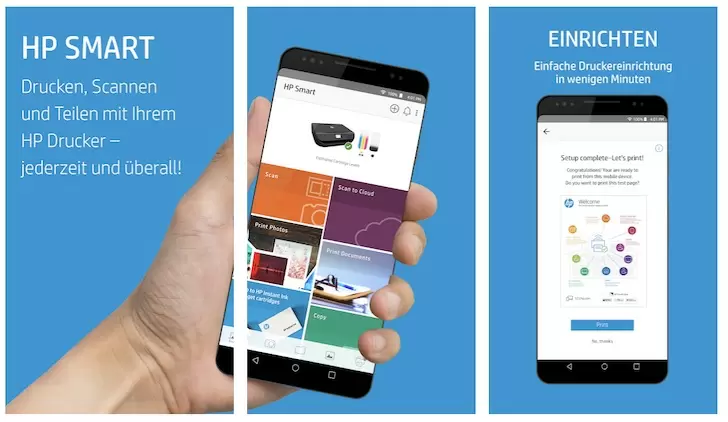
In today’s fast-paced world, staying productive often means managing tasks from wherever you are. Whether you’re working from home, studying, or running a small business, the ability to print, scan, and manage documents on the go is a game-changer. HP Smart is the official mobile app designed by HP Inc. to transform your Android device into a powerful command center for your HP printer. With this app, you can print documents and photos from your phone or cloud storage, scan receipts and contracts using your device’s camera, check ink levels, and even troubleshoot printer issues—all without needing a desktop computer. By bridging the gap between your digital life and physical output, HP Smart turns any HP printer into a seamless extension of your mobile workflow. Whether you need to print a boarding pass at the airport, scan a signed document for a client, or simply refill supplies while on the move, this app puts professional-grade print management right in your pocket.
Key Features
- Print from virtually anywhere – Send print jobs directly from your smartphone or tablet to any compatible HP printer on your network or via HP ePrint, even when you’re miles away. Simply email a document to your printer’s dedicated address, and it will be waiting for you.
- Smart scanning with your phone – Use your Android device’s camera to capture high-quality scans of documents, whiteboards, receipts, and photos. The app automatically detects edges, enhances contrast, and saves the image as a PDF or JPEG. You can also scan directly from a multi-function printer’s scanner bed.
- Copy and fax on demand – Need a quick copy? Just place a page on the scanner glass and tap “Copy” in the app to create a duplicate. For faxing, send documents directly from your phone through the app if your printer supports fax.
- Real-time printer status and supply monitoring – Keep an eye on ink or toner levels, paper tray status, and any error messages without leaving your chair. The app sends alerts when supplies are running low, so you can reorder before a critical print job fails.
- Customizable shortcuts for repetitive tasks – Create one-tap actions like “Scan to Email,” “Print Weekly Report,” or “Copy ID Card.” This speeds up everyday workflows and reduces the number of taps needed for common operations.
- Smart Tasks for automated document workflows – Streamline your day by setting up rules that automatically save scanned documents to cloud services (Google Drive, Dropbox, OneDrive), email them to colleagues, or print them on a schedule. For example, scan a business card to instantly save it as a contact in your phone.
- Built-in troubleshooting and printer support – No more guessing when something goes wrong. The app provides guided diagnostics, firmware updates, and connections to HP support. You can even order genuine HP supplies directly within the app.
Why Choose HP Smart?
HP Smart isn’t just another printer app—it’s a purpose-built productivity tool that integrates deeply with HP’s ecosystem of printers and services. Unlike generic printing apps, HP Smart is optimized for hundreds of HP printer models, ensuring stable performance and access to every feature your printer offers. The user interface is clean and intuitive, with large buttons and clear labels, making it accessible even for users who aren’t tech-savvy. Security is also a priority: the app uses encrypted connections for cloud printing and scanning, so your sensitive documents remain private. For businesses, HP Smart supports multiple printers in different locations, allowing you to manage an entire office fleet from a single device. The app also scales with your needs—whether you have a small home printer or a high-volume office multifunction device, HP Smart adapts to show only the relevant controls. Plus, regular updates from HP add new features and compatibility with the latest Android versions, ensuring you always have a cutting-edge tool at your fingertips.
How to Get the Most Out of HP Smart
To maximize your productivity with HP Smart, start by setting up your printer and connecting it to your Wi-Fi network through the app’s simple setup wizard. Once connected, explore the “Shortcuts” tab and create a few one-tap actions for tasks you do most often—like printing a boarding pass or scanning a receipt to your accounting folder. You can also enable notifications to stay informed about low ink levels and printer errors, which prevents unexpected downtime. For frequent travelers, use the “Print Anywhere” feature by adding your printer’s email address to your contacts. That way, you can forward documents to be printed while you’re on the road.
Another powerful tip: leverage Smart Tasks to automate your document handling. For example, create a task that scans every incoming invoice, saves it as a PDF in your cloud drive, and then emails a copy to your finance department. This eliminates manual steps and ensures consistency. If you use multiple cloud services, connect them all within the app—HP Smart supports Google Drive, Dropbox, OneDrive, and more—so you can print documents directly from any of them. Finally, don’t forget to explore the “Help & Support” section if you ever encounter an issue. The built-in diagnostic tool can run a quick test to identify connectivity or print quality problems and often resolves them with a guided step. By taking a few minutes to customize HP Smart to your workflow, you can save hours every week.
HP Smart is more than a companion app—it’s the key to unlocking the full potential of your HP printer from your Android device. Download it today and experience the freedom of managing your print and scan tasks from anywhere, with zero fuss. Whether you’re a busy professional, a student, or a home user, this app turns your phone into a portable print shop, helping you stay productive and organized in an increasingly digital world. Get HP Smart now and start printing smarter, not harder.