| Title | TracFone My Account |
| Version | R20.1.0 |
| Price | Free |
| Category | Common |
| Package | com.tracfone.tracfone.myaccount |
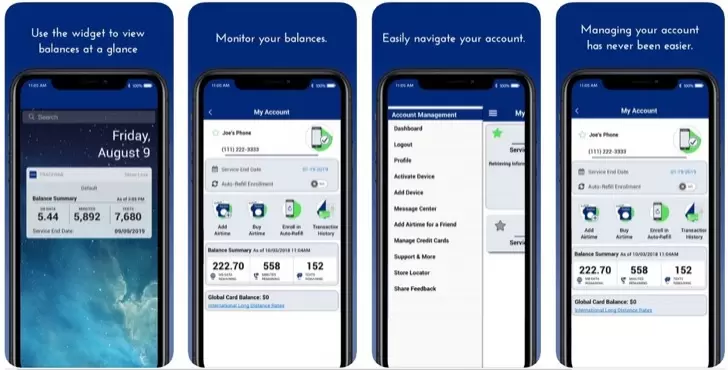
TracFone My Account is the official companion application for users of TracFone Wireless prepaid service. Designed to simplify the management of your TracFone plan, this app puts essential account controls directly on your Android device. Instead of dialing codes or navigating a website, you can check your balance, add airtime, change plans, and view usage details with just a few taps. Whether you are a longtime TracFone customer or just starting with a new phone, this app provides a straightforward and secure way to manage your prepaid wireless service on the go. The app also offers real‑time alerts and notifications, helping you avoid service interruptions and make the most of your plan. With a clean, user‑friendly interface, TracFone My Account is designed to work seamlessly with all TracFone devices, including smartphones, flip phones, and tablets.
Key Features
- Instant Balance & Usage Check – View your remaining minutes, texts, and data at a glance. The dashboard updates in real time so you always know exactly what you have left in your plan.
- Easy Airtime Refills – Purchase additional minutes, texts, or data directly from the app. Multiple payment methods are supported, and the added balance is applied to your account immediately.
- Plan Management – Browse available TracFone plans, switch between monthly options, or add a data pass when you need extra connectivity. All changes take effect on your next billing cycle.
- Usage Tracking – Detailed breakdowns of your call, text, and data usage over time. See how much you use each day or view monthly summaries to help choose the best plan.
- Device Information – Access your phone’s model, serial number (IMEI/MEID), and service expiration date. This is helpful when contacting support or registering a new device.
- Service Alerts – Receive push notifications when your balance is low, when your plan is about to expire, or when you have used a significant portion of your data. No more surprise interruptions.
- Multi‑Line Support – If you manage multiple TracFone lines for family members, you can view and manage each account from within the same app after adding them securely.
Why Choose TracFone My Account
TracFone Wireless has long been a trusted name in prepaid mobile service, offering affordable plans without long‑term contracts. The My Account app extends that convenience into a mobile experience that puts control in your pocket. Rather than remembering complicated codes like *777* or calling customer service for basic tasks, you can now handle everything with an intuitive interface designed for speed and clarity. The app is kept up to date with the latest plan offerings and promotions, so you never miss a deal on additional data or voice minutes. Moreover, because the app is built and maintained by TracFone Wireless itself, you can be confident that your account information is protected with industry‑standard security measures. All transactions are encrypted, and sensitive data is never stored locally on your device. For anyone who wants to get the most out of their pay‑as‑you‑go or monthly prepaid service, this app is an essential tool.
How to Use TracFone My Account
Using the app is straightforward. After downloading and installing it on your Android phone, open it and sign in using the same email address and password associated with your TracFone online account. If you have not created an online account before, you can do so directly from the app by providing your phone number and device serial number. Once logged in, the home screen displays your current balance for voice, text, and data, along with the service end date. Tapping on any of these categories shows detailed usage history. To add airtime, tap the “Refill” button and choose a denomination or plan. You can also switch plans by selecting “Change Plan” – the app lists all available options tailored to your device. For multi‑line accounts, simply tap the profile icon and select the line you wish to manage. The app also includes a help section with FAQs and a direct link to TracFone customer support if you ever need assistance.
Tips and Tricks
To get the most out of TracFone My Account, consider enabling push notifications in your device settings. This way, you will be alerted when your balance drops below a threshold you set, helping you avoid running out of data during an important call or navigation session. Another useful tip is to regularly check the “Promotions” tab within the app – TracFone often offers bonus airtime or data discounts to app users. If you are on a pay‑as‑you‑go plan, keep an eye on your usage breakdown to see if a monthly plan might save you money. You can compare options directly inside the app. Finally, make sure to update your contact information in the app, especially your email address, so you never miss a renewal reminder or important account notification.
TracFone My Account is more than just a balance checker – it is a complete management tool that keeps you connected without hassle. Whether you need to top up for a trip, monitor your teenager’s usage, or simply keep track of your own plan, this app provides the clarity and control every prepaid user deserves. Download it today and take charge of your TracFone service from the palm of your hand.