| Title | ZEDGE™ Wallpapers & Ringtones |
| Version | 7.48.5 |
| Price | Free |
| Category | Common |
| Package | net.zedge.android |
Your smartphone is a reflection of your personality, and ZEDGE™ Wallpapers & Ringtones makes it effortless to give it a fresh, unique look and sound. With one of the largest curated libraries of free personalization content, Zedge puts the power of creativity right in your pocket. Whether you're searching for the perfect HD wallpaper to match your mood, a catchy ringtone that stands out in a crowd, or a subtle notification sound that doesn't annoy, Zedge delivers everything you need — and all without spending a dime. The app combines a vibrant community of creators with intuitive tools, so you can discover, preview, and apply customizations in just a few taps. From nature landscapes to minimalist art, from pop songs to epic movie scores, Zedge offers endless possibilities to make your device truly yours.
Key Features
- Massive, Diverse Content Library – Browse millions of wallpapers, live wallpapers, ringtones, notification sounds, alarm tones, and even font packs. Categories cover everything from anime, gaming, and sports to abstract, nature, holidays, and trending memes.
- High-Quality HD & 4K Wallpapers – Transform your home and lock screen with crisp, vibrant images optimized for your screen size. Zedge supports wallpapers in Full HD, Quad HD, and even 4K resolution, ensuring every detail pops.
- Extensive Ringtones & Notification Sounds – Find that perfect ringtone — from classic tunes, funny one-liners, and sound effects to full-length songs. The same goes for notification sounds, SMS tones, and alarm tones, with new uploads added daily.
- Live Wallpapers That Move – Animate your background with a rich selection of live wallpapers. Choose from mesmerizing abstract loops, gentle nature scenes, sci-fi animations, or interactive designs that respond to touch and motion.
- Smart Search & Personalization – Use intuitive search filters, explore curated collections, or let the app recommend content based on your preferences. Save favorites into custom folders, rate and comment on content, and share creations with friends.
- Preview Before You Apply – Unlike many other personalization apps, Zedge lets you see exactly how a wallpaper or ringtone will look or sound on your device before you commit. This saves time and ensures you’re always happy with your choice.
- Daily Fresh Content & Community Creations – Every day, thousands of new items are uploaded by a global community of artists and enthusiasts. You can also upload your own wallpapers or ringtones, giving you a chance to showcase your talent and earn recognition.
Why Choose Zedge?
With countless customization apps available, what makes Zedge stand out? First and foremost, it’s entirely free — no hidden subscriptions, no pay-per-download model. You get unlimited access to premium-quality content without ever needing to reach for your wallet. The app is backed by a massive, active community that constantly feeds fresh material, so you’ll never run out of inspiration. Whether you want to switch from a serene beach to a neon cyberpunk scene or swap your ringtone every week, Zedge makes it seamless.
Another standout feature is the high level of curation and moderation. Zedge verifies uploads to ensure they meet quality standards and are safe for all ages. You won’t find low-resolution images or broken audio files. Plus, the app integrates directly with your device’s system settings, meaning applying a new wallpaper or assigning a specific ringtone to a contact is a one-tap process. The user interface is clean, fast, and designed to minimize battery drain and data usage, so you can personalize as much as you like without worrying about performance.
How to Use Zedge – Quick Tips for Beginners
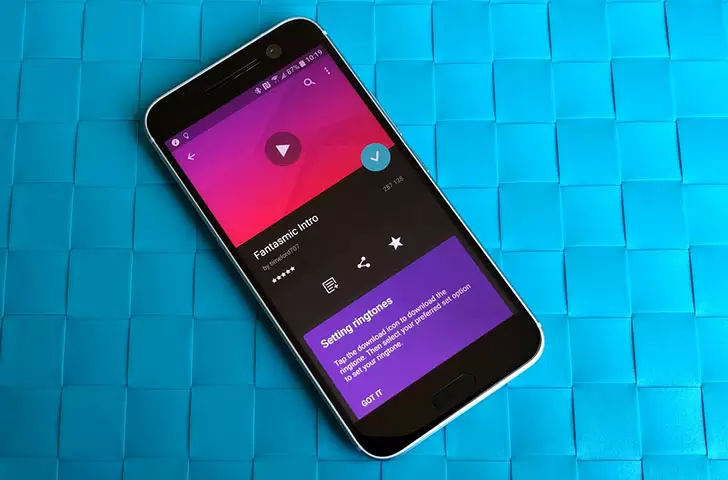
Getting started with Zedge is straightforward. After installing the app, you’ll land on the home feed showing trending and recommended content. Take a moment to explore the tabs at the bottom: Wallpapers, Ringtones, Live Wallpapers, and more. You can also use the search bar at the top to type specific keywords like “sunset” or “acoustic ringtone” and instantly see related results. When you find something you like, tap it to preview. For wallpapers, the preview screen shows how it will look on your home screen and lock screen. For ringtones, you can play a sample and even adjust the start time. Once satisfied, hit the “Set” button and choose whether to apply it as a wallpaper, assign it to a contact, or set it as your default ringtone, notification, or alarm.
To keep your favorites organized, use the “My Collections” feature. You can create custom folders like “Nature,” “Movie Sounds,” or “For Work,” and add content with a tap. This makes switching themes or sounds between different contexts (work vs. weekend) incredibly fast. Another handy tip: if you see a wallpaper you like but want a slightly different color tone, check the “Related” section below the item — Zedge often suggests variations created by the same artist or based on similar tags.
Tips and Tricks for Power Users
Once you’re comfortable with the basics, you can take your personalization to the next level with these advanced strategies. First, use the “Daily” tab to discover the best new uploads every day. Creators often release limited-time exclusive content, and the Daily section highlights the most popular and highest-rated items. Second, don’t overlook the “Editor’s Choice” collections. Zedge’s team curates packs around themes like “Dark Mode Essentials,” “Retro Vibes,” or “Minimalist Phone,” which can save you hours of scrolling.
If you’re a creator yourself, Zedge allows you to upload your own work. Tap the “Upload” button (usually in the side menu) and submit your own wallpapers or ringtones. Add relevant tags and a catchy title to increase visibility. Many artists have built a following on the platform just by consistently sharing high-quality content. Finally, take advantage of the app’s notification settings: you can choose to get alerts when a specific creator posts new content or when items from your favorite categories are updated. This way, you’ll never miss that limited-edition ringtone or wallpaper series.
Another pro tip: combine wallpapers and ringtones to create a cohesive theme. For example, if you download a galaxy-themed wallpaper, search for a space-inspired ringtone or notification sound — such as a sci-fi beep or a deep ambient tone. Zedge makes this easy because the search returns results across all content types, so you can stay in a unified style. Plus, you can set different wallpapers for your home screen and lock screen, giving you double the customization power. Use a calming image for the lock screen and a more energetic one for the home screen, or vice versa.
In a world where our phones are always with us, ZEDGE™ Wallpapers & Ringtones offers a simple yet powerful way to express individuality without breaking the bank. Whether you’re an artist looking for a new canvas, a music lover wanting the perfect ringtone, or just someone who loves to refresh their phone’s look every few days, Zedge delivers. With millions of items, robust search tools, and a welcoming community, it’s the only personalization app you’ll ever need. Download Zedge today and start turning heads with a phone that’s as unique as you are.