| Title | COCOA - COVID-19 Contact App |
| Version | 2.0.1 |
| Price | Free |
| Category | Common |
| Package | jp.go.mhlw.covid19radar |
In the fight against the COVID-19 pandemic, knowledge is power – and the COCOA – COVID-19 Contact App puts that power directly into your hands. Developed by the Japanese Ministry of Health, Labour and Welfare (厚生労働省), this official contact tracing application is designed to help you stay informed about potential exposure to the virus while safeguarding your personal privacy. By leveraging the Bluetooth-based Exposure Notification System built into your smartphone, COCOA works silently in the background to record anonymous interactions with other app users. If you later come into close contact with someone who tests positive for COVID‑19, you will receive a secure notification without ever revealing your identity, location, or any personal details. More than just a tool for individual awareness, COCOA is a community-minded solution that supports public health efforts by enabling faster contact tracing and breaking chains of transmission. Whether you live in Japan or are visiting, installing this free, government‑sanctioned app is a simple yet impactful step you can take to protect yourself and those around you.
Key Features
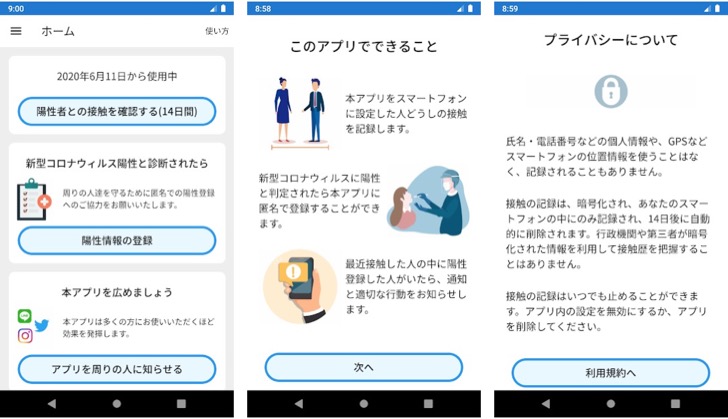
- Anonymous Bluetooth Contact Logging – The app uses low‑energy Bluetooth to exchange random codes with other nearby COCOA users. No GPS, location data, or personally identifiable information is ever collected or stored. Your privacy is built into the very core of the system.
- Instant Exposure Notifications – When a user who has tested positive voluntarily uploads their anonymized keys (with the assistance of a public health center), the app checks your log of daily keys against those of the confirmed case. If a close contact is detected, you receive a private alert with guidance on what to do next.
- Voluntary Positive Result Reporting – If you are diagnosed with COVID‑19, you can choose to contribute anonymously to the system. A health‑care provider will give you a unique processing code that you enter into COCOA. This allows the app to notify your recent contacts without revealing your identity.
- Daily Status Check‑in – A simple in‑app button lets you register your health condition each day (e.g., no symptoms, mild symptoms, etc.). This optional feature helps you keep a personal record and encourages regular self‑monitoring.
- Multilingual Interface – COCOA is available in several languages, including English, Japanese, Korean, Chinese (traditional and simplified), Portuguese, Spanish, Vietnamese, and more. The clear, intuitive design makes it easy for residents and tourists to navigate the app.
- Low Battery Impact – Because the app relies on the efficient Bluetooth Low Energy protocol and does not continuously run in the foreground, it has a minimal effect on your device’s battery life. You can keep it running all day without worry.
Why Choose COCOA?
Amid a sea of contact‑tracing applications, COCOA stands out as the official solution from Japan’s Ministry of Health, Labour and Welfare. This endorsement means the app has undergone rigorous privacy and security reviews, complies with Japan’s strict data protection laws, and is fully interoperable with the national public health system. Unlike third‑party tools, COCOA directly collaborates with local health centers to ensure that notification codes are genuine and that follow‑up advice is accurate and region‑specific. By choosing the official app, you are not only protecting yourself but also participating in a trusted, transparent, and evidence‑based public health initiative.
Furthermore, COCOA employs cutting‑edge cryptography. The random keys exchanged between devices change every 10 to 20 minutes, making it virtually impossible for anyone – including the government – to track your movements or build a profile of your contacts. The system never knows who you are, where you have been, or whom you have met. Your health information remains entirely under your control. This privacy‑by‑design approach has been applauded by digital rights advocates and is a key reason why over 30 million people in Japan have downloaded the app.
How to Use COCOA Effectively
Getting started is straightforward. First, download and install COCOA from the Google Play Store. Upon launching, you will be asked to grant the necessary permissions – specifically Bluetooth access and the ability to send notifications. Once enabled, the app will begin exchanging anonymous keys with nearby COCOA users automatically. You do not need to keep the app open or interact with it; it works silently in the background.
To make the most of the app, enable Bluetooth on your Android device at all times when you are outside your home. While the app itself does not need to be running in the foreground, the system service must remain active. You can check the app’s status indicator to see that contact logging is functioning. If you ever suspect you have been exposed, glance at the notification history – COCOA will show you the date of any recent close contacts. If you receive an exposure alert, follow the instructions provided, which typically include self‑monitoring, getting tested, and contacting your local health center.
Tips and Best Practices
Keep Bluetooth On – The app only works when Bluetooth is enabled. Some users turn off Bluetooth to save battery, but modern Android devices handle Bluetooth Low Energy very efficiently. You can safely leave it turned on all day without a noticeable drain.
Update the App Regularly – COCOA receives updates that improve its compatibility with the latest Android versions and refine the exposure notification algorithm. Enable automatic updates in the Play Store to ensure you always have the latest security and feature enhancements.
Understand What a “Close Contact” Means – COCOA uses a distance threshold of approximately 1 meter (within Bluetooth range) and a cumulative exposure time of 15 minutes over a 24‑hour period to trigger an alert. This aligns with official public health definitions. Not every brief encounter will generate a notification – the system is calibrated to avoid unnecessary alarms while catching meaningful exposures.
Use the Optional Daily Check‑in – Even if you feel perfectly healthy, tapping the “No symptoms” button each day helps build a habit of self‑awareness. If you ever develop symptoms, you can update your status and receive relevant advice.
Remember: The App Is a Safety Net, Not a Pass – COCOA complements, but does not replace, other preventive measures such as wearing masks, practicing social distancing, washing hands, and getting vaccinated. Think of it as an extra layer of protection that helps you make informed decisions about testing and isolation.
Your Privacy, Our Priority
We understand that concerns about data security are top of mind. Rest assured, COCOA never collects your name, phone number, email address, or exact location. The random keys generated by your phone are stored locally and are automatically deleted after 14 days. The only data ever sent to the server is a set of anonymous keys from users who voluntarily report a positive test. These keys cannot be traced back to any individual. Furthermore, the server does not know which keys belong to which user – it only knows that a set of keys is associated with a confirmed case. This design has been reviewed by independent security experts and meets the highest global standards for privacy‑preserving contact tracing.
COCOA is your silent partner in staying safe and informed. By downloading the app and keeping it active, you are not only protecting yourself but also contributing to a powerful community‑wide effort to slow the spread of COVID‑19. Every additional user strengthens the network, making exposure notifications more accurate and timely. Join over thirty million others who have already taken this responsible step. Download COCOA today and do your part to keep Japan – and everyone in it – healthy and resilient.