| Title | Canon PRINT Inkjet/SELPHY |
| Version | Varies with device |
| Price | Free |
| Category | Common |
| Package | jp.co.canon.bsd.ad.pixmaprint |
Canon PRINT Inkjet/SELPHY is an essential mobile companion for anyone who owns a compatible Canon inkjet printer or SELPHY photo printer. Developed by Canon Inc., this free application transforms your smartphone or tablet into a powerful command center for all your printing needs. Whether you need to print important documents, cherished photos, or creative projects, this app streamlines the entire process with intuitive controls and a wealth of features. No more fumbling with cables or transferring files to a computer; simply connect wirelessly and print directly from your mobile device. The app supports a wide range of Canon printers, including PIXMA, MAXIFY, and SELPHY series, making it the go‑to tool for home offices, small businesses, photography enthusiasts, and families alike. With its clean interface and reliable performance, Canon PRINT Inkjet/SELPHY simplifies printing tasks and enhances productivity, all while allowing you to enjoy the convenience of mobile printing that fits your lifestyle.
Key Features
- Wireless Direct Printing – Print documents, photos, and web pages directly from your smartphone or tablet without needing a computer. The app supports both Wi‑Fi and Direct Connection modes, making it easy to print even when you are away from your home network.
- Scan to Mobile – Turn your Canon printer into a powerful scanner. Use the app to scan documents or photos and save them directly to your mobile device in high resolution. You can also edit scanned images, adjust settings, and share them instantly.
- Creative Photo Printing – Unleash your creativity with a variety of layout options, filters, frames, and stickers. Print multiple photos on one page, create collages, or add text and decorative elements to your images before printing.
- Cloud and Social Media Integration – Print directly from popular cloud services like Google Drive, Dropbox, and OneDrive, as well as from your photo gallery. You can also print photos from Facebook, Instagram, and other social media platforms with ease.
- Advanced Settings and Maintenance – Access printer settings such as paper size, print quality, and ink levels. The app also provides maintenance tools like nozzle check, cleaning, and alignment to keep your printer running smoothly.
- Multiple File Format Support – Print not only images but also PDF, Word, Excel, and PowerPoint files. The app supports a wide range of document formats, making it suitable for both personal and professional use.
- Copy and Fax Functions – Use your mobile device as a remote control for the printer’s copy and fax features. Adjust copy settings like number of copies, scale, and color, then start copying directly from your phone.
Why Choose Canon PRINT Inkjet/SELPHY
Canon has been a trusted name in imaging for decades, and this app extends that reliability to your mobile experience. One of the standout advantages is the ease of setup: the app automatically detects compatible Canon printers on your network and guides you through a seamless connection process. Even if you are not tech‑savvy, you can be up and running in minutes. The app’s interface is thoughtfully designed with large icons and clear labels, making navigation straightforward for users of all ages. Another compelling reason to choose this app is its comprehensive feature set. It goes beyond basic printing by offering advanced scanning, creative editing, and remote maintenance tools that you would typically only find on a computer. This means you can manage nearly every aspect of your printing workflow from the palm of your hand. Moreover, the app is regularly updated by Canon to ensure compatibility with new printer models and mobile operating systems, giving you peace of mind that your investment is future‑proof.
Security is also a key consideration. The app uses encrypted connections when transferring data between your device and the printer, protecting your documents and personal information. For business users, the ability to print Microsoft Office documents and PDFs directly from cloud storage is a huge time‑saver. Students and teachers can quickly print assignments or handouts without needing a computer. Photography lovers will appreciate the high‑quality photo printing options, including borderless prints and fine‑art paper settings. The app even supports printing on disc labels for compatible printers, perfect for creating custom CD/DVD covers. With Canon PRINT Inkjet/SELPHY, you get a versatile tool that adapts to your daily needs, whether you are at home, in the office, or on the go.
How to Use Canon PRINT Inkjet/SELPHY
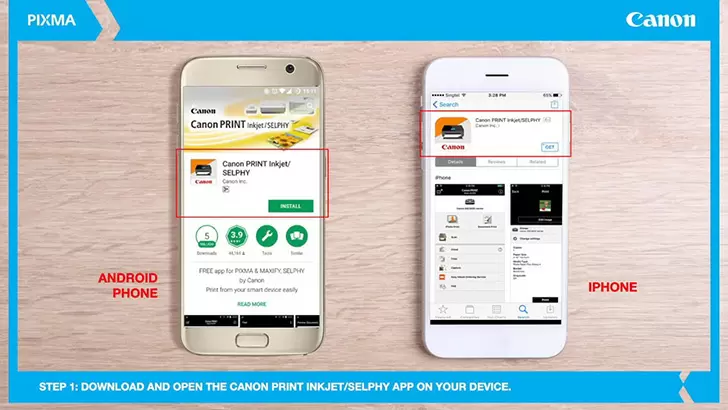
Getting started is simple. First, ensure your Canon printer is powered on and connected to your Wi‑Fi network. If your printer supports Direct Connection, you can also connect directly to your mobile device without a router. Download and install the Canon PRINT Inkjet/SELPHY app from the Google Play Store. Open the app, and it will automatically search for nearby printers. Select your printer from the list, and the app will guide you through any remaining setup steps, such as entering a PIN if required. Once connected, you will see the main screen with options for Print, Scan, Copy, and more. To print a photo, tap the “Print” icon, choose an image from your gallery or cloud storage, adjust settings like paper size and quality, then tap “Print.” For documents, you can open a file directly from your device or cloud service and print it with the same ease. The scanning feature works similarly: tap “Scan,” select the printer, preview the scan on your phone, and save or share it. The app also lets you monitor ink levels and perform printer maintenance from the “Maintenance” section.
For advanced users, the app offers customization options. You can create custom profiles for different print jobs, save frequently used settings, and even set up shortcuts for rapid printing. The “Creative Print” feature (available for select models) allows you to add artistic effects, such as comic, drawing, or pop art styles, to your photos before printing. This is especially fun for creating personalized gifts or decorations. The app also supports printing from NFC‑enabled Canon printers – simply tap your device against the printer to establish a connection instantly. Additionally, you can use the app to send print jobs to multiple Canon printers at once, which is handy for small offices with multiple machines.
Tips and Tricks for Getting the Most Out of the App
To make the most of Canon PRINT Inkjet/SELPHY, start by keeping your app and printer firmware updated – updates often bring new features and improved stability. When printing photos, use the “Auto Photo Fix” option to automatically correct brightness, contrast, and red‑eye. For documents, enable “Save as PDF” in the app to create digital copies of your scans before printing, which is great for archiving. If you frequently print from cloud services, consider setting up shortcuts on the app’s home screen so you can access your most used folders with one tap. Another useful trick is to use the “Quiet Mode” setting to reduce printer noise during night hours – perfect for shared living spaces. You can also set a default printer profile to automatically apply your preferred settings (e.g., grayscale, double‑sided) every time you print, saving you time on repetitive tasks. For SELPHY photo printers, the app offers special layouts like passport photo templates – a must‑have for travel documents. Finally, take advantage of the “Printer Information” feature to monitor ink levels and receive notifications when supplies are low, ensuring you never run out mid‑print.
Whether you are a busy professional needing to print contracts on the fly, a parent printing school projects, or a photography enthusiast creating gallery‑worthy prints, Canon PRINT Inkjet/SELPHY delivers a reliable and feature‑rich mobile printing experience. Download the app today and unlock the full potential of your Canon printer. With its intuitive design, powerful tools, and seamless connectivity, it is the ultimate companion for all your printing needs.