| Title | Workday |
| Version | 2022.46.236.452069 |
| Price | Free |
| Category | Common |
| Package | com.workday.workdroidapp |
In the fast-paced world of modern business, staying on top of your work life, finances, and team collaboration is essential. Workday brings the power of enterprise resource planning directly to your pocket, transforming the way you manage daily tasks, track time, access payslips, and connect with your organization. Whether you're an HR professional, a manager, or a team member, Workday streamlines the most routine yet critical workflows, so you can focus on what truly matters. With its intuitive interface, robust security, and seamless integration with the broader Workday ecosystem, this app is your single gateway to HR, payroll, talent management, and financial insights. No more juggling between multiple platforms or waiting for desktop access—everything you need is just a tap away.
Key Features
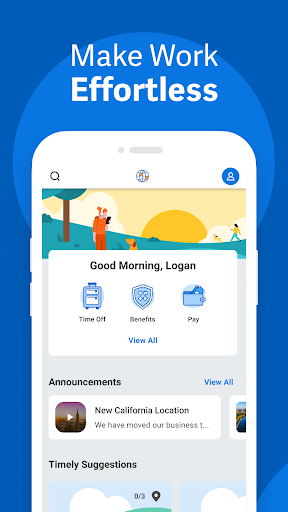
- Unified Dashboard for All Things Work – Get a personalized view of your tasks, approvals, time off requests, upcoming payments, and team updates. The dashboard adapts to your role and preferences, bringing the most important information front and center.
- Easy Time Tracking and Absence Management – Clock in and out, log hours, submit time off requests, and view your leave balances with a few taps. The app supports multiple time‑tracking methods, including geolocation and manual entry, making it perfect for both office and field workers.
- Pay and Compensation at Your Fingertips – Access your latest payslips, tax documents, and compensation details securely. You can view historical pay data, understand deductions, and even set up direct deposit preferences – all without logging into a separate payroll system.
- Approvals and Workflow Management – Approve or reject expenses, time sheets, purchase orders, and more on the go. The app sends real‑time notifications so you never miss a critical decision, and you can even delegate approvals when you’re out of office.
- People Directory and Collaboration – Find colleagues across your organization quickly, view their contact details, reporting structure, and even send them a chat or email directly from the app. Foster better teamwork with simplified communication tools integrated into the platform.
- Performance and Talent Management – Set goals, receive feedback, conduct performance reviews, and track your career development progress. Managers can view team performance summaries and initiate check‑ins, making talent conversations more continuous and meaningful.
- Enterprise‑Grade Security and Privacy – Workday employs advanced encryption, multi‑factor authentication, and compliance with global data protection regulations. Your corporate data remains safe whether you’re connected to Wi‑Fi or using mobile data.
Why Choose Workday for Your Business
Workday isn’t just another business app – it’s a full‑fledged extension of your company’s human capital management and financial systems. Unlike many standalone tools that force you to switch between apps for HR, payroll, and time tracking, Workday integrates everything into a single, consistent experience. This means less duplication, fewer errors, and a single source of truth for both employees and administrators. The app is designed to work seamlessly with your organization’s existing Workday setup, so you don’t need to learn new workflows or re‑enter data. Plus, its real‑time sync ensures that any changes made on mobile are immediately reflected on the desktop version and vice versa.
Another standout advantage is its adaptability. The app intelligently tailors itself to your role and usage patterns. A manager sees different dashboards and approval queues compared to an individual contributor. HR professionals get quick access to people analytics and compliance tools, while finance users can review spend authorizations and budget snapshots. This role‑based customization reduces clutter and speeds up everyday tasks. Moreover, the app supports multiple languages and currencies, making it a true global solution for multinational teams.
How to Get the Most Out of Workday
To maximize your productivity with Workday, start by customizing your notifications. The app allows you to choose which alerts you want to receive – from upcoming pay dates and time off approvals to performance review reminders. Tailor these to your role and preferences so you never feel overwhelmed. Next, explore the"Quick Actions"menu, which lets you clock in, submit expenses, or view your schedule without navigating through multiple screens. These shortcuts save precious seconds every day.
For managers, setting up delegation rules is a game‑changer. When you’re away, you can automatically route approvals to a trusted colleague, ensuring business continuity. Another pro tip: leverage the"Favorites"feature to pin the tasks, reports, or people you access most frequently. This creates a personalized launchpad that speeds up your daily routines. Finally, take advantage of the built‑in help resources – the app includes contextual tips and a knowledge base that explains each feature in plain language, so you can solve issues quickly without contacting support.
Tips and Tricks for a Seamless Experience
Stay ahead of deadlines by enabling push notifications for pending approvals and upcoming deadlines – this is particularly useful during month‑end closing or performance review cycles. If you work across multiple time zones, use the"My Schedule"view to see your own calendar along with your team’s availability, making meeting scheduling effortless. For users who frequently submit expense reports, consider using the receipt capture feature: simply snap a photo of your receipt, and the app automatically extracts key details like amount, date, and merchant – reducing manual entry and speeding up reimbursement.
Another valuable trick is to set up your"Home"screen widgets (on supported devices) to show your next pending approval or current time balance. This way, you get key information at a glance without opening the app every time. For organizations that use Workday’s learning modules, you can access training materials directly from the app, complete courses on your commutes, and even track your certification progress. The app also supports offline actions for certain tasks – you can capture time or receipts when you have no internet connection, and the data will sync automatically once you’re back online.
Closing Thoughts
Workday is more than a mobile app – it’s your personal assistant for work‑life management. By bringing the full power of your organization’s HR, finance, and operations into the palm of your hand, it eliminates friction, saves time, and empowers you to make informed decisions wherever you are. Whether you’re an employee checking your next paycheck, a manager approving a team member’s leave, or an executive reviewing quarterly budgets, Workday delivers a seamless, secure, and delightfully simple experience. Download the app today and discover how you can transform your daily work routine into something more efficient, connected, and human‑centric.