| Title | United Airlines |
| Version | 4.1.68 |
| Price | Free |
| Category | Common |
| Package | com.united.mobile.android |
Whether you're a frequent flyer or planning your next great escape, the official United Airlines app is your all-in-one travel companion designed to streamline every step of your journey. From booking a flight to checking in, tracking your bags, and navigating airport terminals, this powerful tool puts everything you need right at your fingertips. Built with the modern traveler in mind, the app integrates seamlessly with United’s MileagePlus loyalty program, offers real-time updates, and provides intuitive tools to help you manage your itinerary with ease. Say goodbye to long airport queues and confusing flight boards – with the United Airlines app, your travel experience becomes smoother, more efficient, and far less stressful.
Key Features
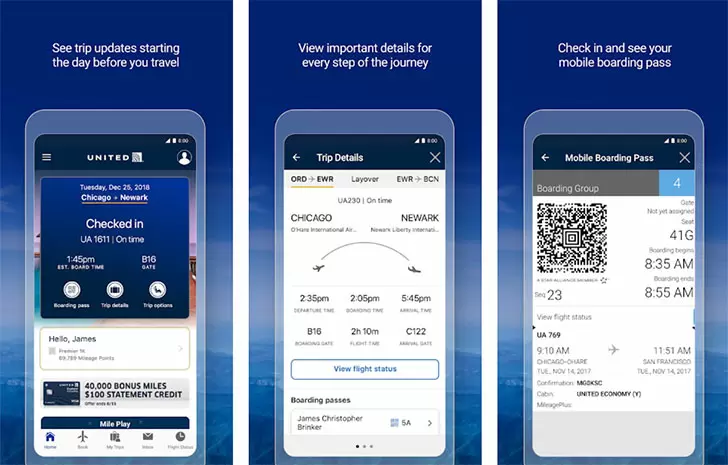
- Effortless Flight Booking and Management: Search for flights, compare fares, and book directly within the app. Easily view your upcoming trips, modify seat selections, add bags, or change flights without picking up the phone. The interactive timeline shows your entire day-of-travel plan, including gate information and boarding times.
- Real-Time Flight Status and Notifications: Receive instant push notifications for gate changes, delays, cancellations, and boarding updates. You’ll never miss a critical update – the app keeps you informed every step of the way, even when you’re moving through the airport.
- Mobile Boarding Pass and Check-In: Check in for your flight 24 hours before departure and save your boarding pass directly to the app. The digital pass includes a scannable barcode, and you can access it offline – perfect for when you’re roaming or have limited data.
- MileagePlus Integration: Manage your MileagePlus account, view your current mileage balance, track progress toward your next award, and redeem miles for flights or upgrades. The app also remembers your preferences and allows you to choose your preferred seats and meal options for eligible flights.
- Baggage Tracking and Receipts: Got a checked bag? The app lets you track your luggage from drop-off to arrival. You’ll receive updates when your bag is loaded, transferred, and ready for pickup. Plus, you can access baggage receipts and claim information directly through the app.
- United Hub Airport Navigation: Explore interactive maps of major airports where United operates. Find your gate, check security wait times quickly, locate lounges, restaurants, and restrooms, and even get turn-by-turn directions inside the terminal – a lifesaver during tight connections.
- Travel Information and Tools: Access your itinerary, flight details, weather at your destination, and local time zones. The app also provides details on onboard amenities, including Wi-Fi availability, power outlets, and entertainment options, so you can plan your inflight experience.
Why Choose the United Airlines App
In a world where every minute counts, the United Airlines app gives you the power to control your travel from the palm of your hand. Unlike generic flight trackers or third-party booking sites, this official application is built directly on United’s systems, meaning you get the most accurate, up‑to‑date information straight from the source. For MileagePlus members, the app provides an integrated view of your status, upcoming elite benefits, and the ability to upgrade with miles or PlusPoints – all without logging into a separate website. The app is also optimized for speed and reliability, with a clean interface that helps you find the information you need quickly, even in low connectivity areas.
Another standout advantage is the personalized experience. After you sign in, the app remembers your preferences – from seating choices to saved payment methods – and tailors suggestions based on your travel history. You can also set alerts for specific routes or fare drops, making it easier to book your ideal trip at the right price. For families traveling together, the app allows you to manage multiple reservations on one device, so you can check in, choose seats, and track bags for everyone in your party.
How to Get the Most Out of the United Airlines App
Start by downloading the app and signing in with your MileagePlus account. If you don’t have one yet, creating it is quick and free. Once you’re signed in, enable push notifications to receive real‑time alerts about your flights. Before you even get to the airport, use the check‑in feature (available 24 hours prior to departure) to secure your boarding pass and optionally choose a seat if you haven’t already. The mobile boarding pass is accepted at most TSA checkpoints and gates, but it’s wise to also have a screenshot saved just in case of connectivity issues.
When you’re at the airport, open the app to view the interactive terminal map – it will show your departure gate, nearby restaurants, and the estimated walk time. If you have a long layover, you can browse United Club locations and access information about lounge amenities or day passes. For connecting flights, the app will automatically suggest the best route through the terminal and alert you if the connection is tight.
Need to change your flight? Simply go to your trip details and tap “Change Flight” – you can see alternative options, including fees and fare differences, without waiting on hold. The app also allows you to add a checked bag, pre‑pay for it, and track its journey. For international travel, you’ll find helpful tools like passport scanning and travel document reminders, so you never miss a required visa or arrival form.
Tips and Tricks for a Smoother Journey
One often‑overlooked feature is the ability to set up “Flight Status” widgets on your phone’s home screen. On Android, you can add a widget that shows your next flight’s departure time, gate, and status at a glance – no need to open the app. Another tip: before you board, use the app to pre‑order food or drinks on eligible flights. United offers a “buy onboard” menu that you can access via the app, ensuring your favorite snack or meal is ready for you when the cart comes around.
If you are part of the MileagePlus Premier status program, you can view your upgrade waitlist position and priority boarding sequence directly in the app. Also, after you land, the app will continue to help you: you can check the carousel number for baggage claim, request a ride via your preferred ride‑share service, or even book a hotel room at your destination. For frequent travelers, the app also remembers your seat preferences for future bookings – so if you always prefer an aisle seat near the front, the app will automatically apply that choice when you book.
Finally, don’t forget to rate the app and provide feedback – United Airlines regularly updates its feature set based on traveler input. Whether you’re looking for a more seamless check‑in process, better accessibility options, or more detailed aircraft information, your suggestions help shape the future of the app.
Closing Thoughts
The United Airlines app is more than just a digital boarding pass – it is a comprehensive travel management system that adapts to your needs, whether you are flying across the country or around the world. With its robust feature set, real‑time updates, and deep integration with MileagePlus, it saves you time, reduces anxiety, and puts you in control of your itinerary. Download the app today and experience a smarter way to fly with United Airlines.