| Title | Pedometer - Step Counter App |
| Version | 5.41 |
| Price | Free |
| Category | Common |
| Package | com.tayu.tau.pedometer |
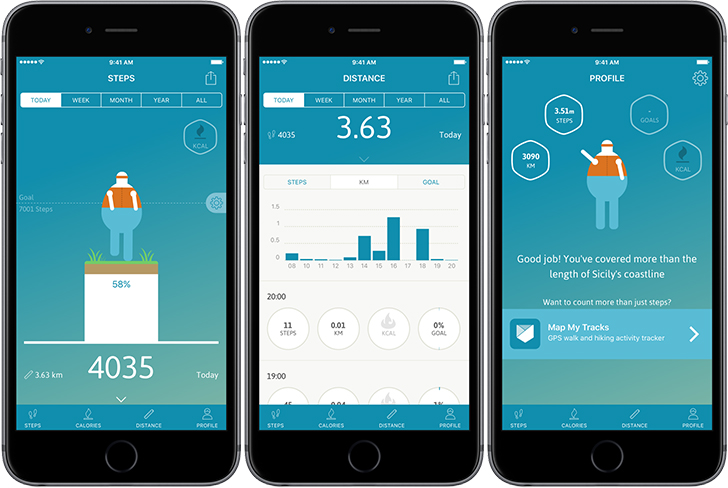
Pedometer - Step Counter App, developed by ITO Technologies, Inc., is a lightweight, highly accurate health companion designed to help you track your daily movement effortlessly. No fancy wearables, no complicated setups—just your phone in your pocket or bag, and the app does the rest. By leveraging advanced sensor algorithms, this pedometer automatically counts every step you take, records distance covered, estimates calories burned, and monitors active time. Whether you're a dedicated fitness enthusiast, someone just starting a healthier lifestyle, or simply curious about how much you move during the day, this app offers a straightforward, reliable way to stay informed about your physical activity. The app runs silently in the background with minimal battery drain, so you can focus on living your day while it quietly logs your progress. It's designed to be accessible to all ages and fitness levels, with a clean interface that shows your stats at a glance. No registration or login required—just download, grant permission, and start counting. The app also supports theme customization to match your style, and it includes a walking tracker that works even when your screen is off. This is the tool you need to turn your everyday steps into a clear picture of your health journey.
Key Features
- Auto Step Counting – The app uses your phone’s built-in accelerometer and sensor fusion to count steps with high accuracy. It works in the background without draining your battery, so you don’t have to manually start or stop it. It detects walking, running, and even climbing stairs.
- Distance & Calorie Tracker – Based on step count and your personal profile (height, weight, stride length), the app calculates the total distance you walked or ran and estimates how many calories you burned. This gives you real-time feedback on your activity level.
- Active Time Monitoring – See how long you spent moving during the day. The app breaks down your activity into different periods, helping you understand your patterns and encouraging you to sit less and move more.
- Daily, Weekly & Monthly Stats – Keep an eye on your progress with clear graphs and summaries. View step counts, distances, and calories across time frames to track improvement and set personal records. The app also shows your step count history so you can compare day to day.
- Goal Setting & Progress Tracking – Set a custom daily step goal (e.g., 10,000 steps) and get notifications when you reach milestones. The app celebrates your achievements with motivational messages and a progress bar that fills as you move closer to your target.
- Theme Customization – Choose from a variety of background themes and color schemes to personalize your dashboard. Whether you prefer a minimal light design or a vibrant dark mode, the app adapts to your visual preferences.
- Low Power Consumption – Unlike many fitness apps that drain your battery quickly, this pedometer is optimized to run efficiently. It uses sensor batching and efficient algorithms to minimize resource use while maintaining accuracy. You can keep the app running all day without worrying about your phone dying.
Why Choose Pedometer - Step Counter App?
In a world full of complicated fitness trackers and subscription-based health platforms, this app stands out for its simplicity and reliability. You don’t need to buy any extra hardware or remember to charge a wearable. Your smartphone is all you need. The app is completely free to download with no hidden fees, and it respects your privacy—no account required, no personal data uploaded to servers unless you choose to enable optional backup. The accuracy is impressive for a purely phone-based solution. ITO Technologies has fine-tuned the algorithm to filter out false steps from phone vibrations or pocket jostling, giving you a more realistic count. The interface is clean, intuitive, and designed for quick glances: open the app and instantly see your steps, distance, and calories. The app also includes a simple step counter widget that you can place on your home screen for even faster access. Many users appreciate the lack of advertisements that clutter the screen; while the app may show occasional non-intrusive ads, they do not interfere with the core functionality. For those who want a no-nonsense, straightforward way to incorporate more movement into their daily life, this pedometer is an ideal choice.
Another reason to choose this app is its adaptability to different lifestyles. Whether you're a runner, a walker, or someone who just wants to hit a basic step goal, the app’s settings let you fine-tune stride length and weight for more accurate calorie and distance estimates. It also supports multiple themes, making it pleasant to use throughout the day. The app's background operation is seamless—no need to keep your screen on or worry about it closing accidentally. It even works when your phone is in power-saving mode, ensuring you never miss a step. For families, this app can be installed on multiple devices and each person can set their own goals, making it a great tool for friendly step competitions or group health challenges. Finally, the app receives regular updates from the developer, with bug fixes and feature improvements based on user feedback. This commitment to quality means you can rely on the app for the long term.
How to Use Pedometer - Step Counter App
Getting started is incredibly easy. After downloading and installing the app from the Google Play Store, simply open it. You will be asked to grant the app permission to access your activity recognition or motion sensors—this is required for step counting. Once allowed, the app immediately starts logging your steps in the background. Next, you can optionally set your personal profile by tapping the settings icon and entering your height, weight, and stride length. If you don’t know your stride length, the app provides a simple method to estimate it. You can also set a daily step goal (the default is 10,000 steps) and choose the theme you prefer. After that, just put your phone in your pocket, bag, or hold it while walking. The app will automatically track your steps, distance, active time, and calories. To view your progress, open the app anytime—the home screen shows your current stats and a progress ring. Swipe or tap on the charts to see weekly or monthly data. If you want to reset your day’s stats, you can do so in settings, but normally the app resets at midnight. For more motivation, enable notifications to get reminders if you’re inactive for too long or congratulations when you hit a goal.
For optimal accuracy, carry your phone in a pocket (front or back) or a bag that moves naturally with your body. Avoid placing it in a backpack that swings excessively, as that may cause miscounts. The app works best when the phone is not in a stationary position (like a desk) for long periods because it will not mistakenly add steps from vibrations. If you are running or walking on a treadmill, the app still counts steps because the phone detects the motion, but distance and calorie calculations may be less accurate due to lack of GPS. For outdoor activities, you may also enable GPS tracking if desired (some users prefer it for detailed route logging, but the step counter works without GPS).
Tips and Tricks for Better Results
To maximize the accuracy and usefulness of this pedometer, consider the following tips. First, calibrate your stride length correctly. A simple way: walk 10 steps at a normal pace, measure the distance from start to finish in meters or feet, then divide by 10. Enter that value in settings. Second, keep the app running in the background—do not force-close it, as that will stop counting. If your phone has aggressive battery optimization settings, add the pedometer to the list of apps that are allowed to run unrestricted (you can usually find this in your phone’s battery settings). Third, if you find the step count too high or too low, adjust the sensitivity in the settings. Some users on certain phones may need to increase sensitivity if steps are missed, or decrease if false steps occur during car rides. Fourth, make use of the widget feature—place a step counter widget on your home screen for instant access without opening the app. Fifth, engage with the app’s charts to discover your most active days and times. This awareness can help you plan more walks or runs. Finally, share your achievements with friends through the app’s share feature (if available) or simply use it as a personal challenge to beat your own records. The app’s simplicity means you can focus on moving, not on complex analytics.
Remember, this pedometer is not a medical device and should not be used as a substitute for professional health advice. However, it is an excellent motivational tool to encourage more daily movement. Many users find that simply seeing their step count increases their awareness and leads to healthier habits like taking the stairs, parking farther away, or going for short walks during breaks. The app also tracks your walking time, so you can aim to meet the recommended 30 minutes of moderate activity per day. Combined with a balanced diet, this simple activity tracker can be a cornerstone of your wellness routine. No battery anxiety, no subscriptions, no complicated learning curve—just pure step counting that works.
Overall, Pedometer - Step Counter App from ITO Technologies, Inc. is a robust, user-friendly solution for anyone looking to monitor their daily steps and overall physical activity. Its combination of accuracy, low resource usage, customization, and straightforward design makes it one of the best pedometer apps available on Android. Whether you are a fitness beginner or a seasoned athlete, this app can help you stay accountable and motivated. Download it today and take the first step toward a more active and healthier life.