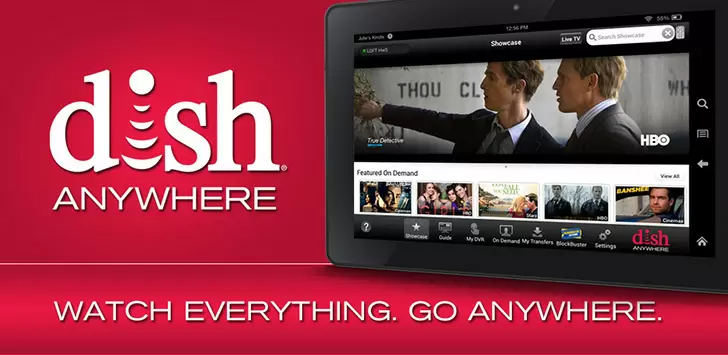
| Title | DISH Anywhere |
| Version | Varies with device |
| Price | Free |
| Category | Common |
| Package | com.sm.SlingGuide.Dish |
DISH Anywhere transforms your mobile device into a powerful portable television, letting you take your full DISH subscription with you wherever life leads. Whether you are commuting, traveling, or simply relaxing in a different room, this app gives you immediate access to live TV, your DVR recordings, and thousands of on-demand titles. Developed by DISH Network Corporation, the app connects seamlessly to your home receiver, so you never have to miss a moment of your favorite shows, sports events, or breaking news. With an intuitive interface and robust streaming capabilities, DISH Anywhere redefines what it means to watch TV on the go.
Key Features
- Live TV Streaming – Watch over 130 live channels directly from your smartphone or tablet. From news and sports to movies and kids’ programming, enjoy the same channel lineup you have at home without any extra hardware.
- DVR Access & Management – Access your recorded shows instantly from the cloud or your home DVR. You can also schedule new recordings remotely, so you never forget to capture an important episode or game.
- On-Demand Library – Browse thousands of movies and TV episodes available on demand. Many titles are included with your subscription, and you can rent or purchase premium content with a few taps.
- Multi-Device Support – Stream on up to three devices simultaneously, depending on your DISH plan. The app works on Android phones and tablets, and you can even cast to compatible smart TVs or Chromecast devices.
- Download for Offline Viewing – Save your DVR recordings or select on-demand shows to your device for offline playback. Perfect for flights, road trips, or areas with limited internet connectivity.
- Personalized Watchlist – Create a custom watchlist of your favorite shows and movies. The app will notify you when new episodes are available or when a program is about to air live.
- Parental Controls – Keep your family safe with built-in content restrictions based on ratings channels. Set PIN codes to prevent access to mature content.
Why Choose DISH Anywhere?
In a world where cord-cutting is on the rise, DISH Anywhere stands out by offering a true extension of your existing cable subscription rather than a separate streaming service. There is no additional monthly fee to use the app; it is included free with any DISH TV package. This means you get all the channels you already pay for, along with your DVR recordings, without buying extra hardware or dealing with complicated setups. The app integrates directly with your Hopper or Wally receiver, so your recordings and schedules stay synchronized across all your devices.
Another major advantage is the app’s stability and streaming quality. DISH Anywhere uses adaptive bitrate technology to adjust video quality based on your internet connection, ensuring smooth playback even on slower networks. You can choose between standard and high definition for most content, and the app supports both Wi-Fi and cellular data streaming. For those who want to avoid data caps, the download feature is a lifesaver—just grab your shows before leaving home and watch them offline with zero buffering.
Security and privacy are also top priorities. Your account is protected by your DISH login credentials, and you can enable two-factor authentication for an extra layer of security. The app does not share your viewing habits with third parties, and all streams are encrypted. With regular updates adding new features and channel support, DISH Anywhere continues to evolve as a reliable companion for every DISH subscriber.
How to Use DISH Anywhere
Getting started is straightforward. First, download the app from the Google Play Store and install it on your Android device. Open the app and sign in using your DISH username and password. If you do not have an online account, you can create one through the app by entering your DISH account number and ZIP code. Once logged in, the app will automatically connect to your home receiver and load your channel lineup, DVR list, and on-demand options.
The home screen is divided into sections: Live TV, DVR, On Demand, and Search. Tap on any section to browse content. For live TV, you can view the full channel guide just like on your TV set, complete with program descriptions and air times. To watch, simply tap a channel—the stream begins in seconds. For DVR recordings, you can sort by date, title, or type, and tap any recording to play it. The playback controls allow you to pause, rewind, fast-forward, and skip commercials.
Scheduling recordings is just as easy. While browsing the live guide or searching for a show, tap the record icon to set a single recording or a series pass. You can also manage your recording conflicts, prioritize shows, and delete old content directly from the app. For offline viewing, locate a compatible show or DVR recording, tap the download button, and it will be saved to your device’s local storage. Downloaded content can be viewed even when you have no internet connection.
To get the most out of the app, explore the settings menu. Here you can adjust video quality preferences, enable notifications for favorite shows, manage your watchlist, and configure parental controls. If you have multiple receivers in your home, you can select which one to stream from in the settings. The app also supports picture-in-picture mode on Android, allowing you to watch TV while using other apps.
Tips and Tricks for a Better Experience
To ensure smooth streaming, always use a stable Wi‑Fi connection when possible. If you must use cellular data, be aware of your data cap—streaming in HD can use up to 2GB per hour. Lowering the video quality to standard definition can help conserve data. Also, close background apps that might compete for bandwidth.
Make use of the “Resume Watching” feature. If you stop a live show or recording mid-playback, the app remembers exactly where you left off across all your devices. You can jump back in from your phone, tablet, or even your living room TV without losing your place. Additionally, the search function is powerful: you can search by show name, actor, genre, or even specific episodes. Use it to find content quickly rather than scrolling through hundreds of channels.
For sports fans, set alerts for your favorite teams. DISH Anywhere allows you to receive notifications when a game goes live or when an event starts. You can also record entire seasons of shows with a single tap using the “Season Pass” option. And if you ever encounter buffering issues, try restarting the app or your home receiver—most problems are solved with a simple reboot.
Finally, consider using the app’s cast functionality to watch on a bigger screen. If you have a Chromecast or Android TV, tap the cast icon from within the app to beam live TV or on-demand movies directly to your television. This turns your phone into a remote control without losing the ability to browse other content.
Conclusion
DISH Anywhere is more than just a companion app—it is a full-featured streaming platform that puts your entire DISH experience in the palm of your hand. With live TV, DVR access, offline downloads, and a vast on-demand library, it offers unmatched flexibility for subscribers who want to watch their favorite content anytime, anywhere. The app is free, secure, and constantly improving, making it an essential download for anyone with a DISH subscription. Open the Google Play Store now and start enjoying television without boundaries.