| Title | Passport Parking |
| Version | 7.2.0 |
| Price | Free |
| Category | Common |
| Package | com.passportparking.mobile |
Passport Parking transforms the way you pay for on-street and off-street parking. Instead of fumbling for coins, hunting for a credit card slot, or rushing back to feed a physical meter, this intelligent mobile app lets you manage your parking sessions entirely from your smartphone. Developed by Passport Labs, Inc., the app is trusted by hundreds of municipalities, universities, and private parking operators across North America. Whether you are running errands, commuting to work, or exploring a new city, Passport Parking brings speed, convenience, and flexibility to the everyday chore of parking. Simply enter the zone number displayed on nearby signage, select your desired duration, and complete the payment within seconds. The app stores your vehicle information and payment details so future sessions are even faster. With real-time notifications, you never have to guess when your time is about to expire. Passport Parking is more than a digital meter—it is a complete parking assistant that helps you avoid tickets, save money by paying only for the time you actually use, and keep your wallet free of loose change.
Key Features
- Quick and contactless payment – Enter the zone number shown on parking signs, choose your length of stay, and pay securely through the app. No need for cash or physical credit cards. Your payment is processed instantly and the meter is updated in real time.
- Extend your parking remotely – Forgot to add enough time? Caught in a long meeting or enjoying a late lunch? Open the app and extend your session from wherever you are. No more running back to the car or worrying about an expired meter.
- Multi-vehicle management – Register multiple license plates and easily switch between them for each parking session. This is ideal for households with two cars, rental vehicles, or when you borrow a friend’s car. The app remembers each vehicle’s details for a seamless experience.
- Detailed payment history and receipts – Every transaction is recorded in the app. View your past parking sessions, amounts paid, locations, and timestamps. You can also email yourself receipts for expense reports, reimbursements, or tax purposes.
- Automatic reminders and notifications – Enable push notifications to receive alerts when your parking session is about to expire. Depending on your location and local policies, you may be able to extend directly from the reminder message, giving you peace of mind even during busy days.
- Customizable favorite zones – Do you park in the same lot or street zone every day? Save it as a favorite. The app will remember your preferred duration and vehicle, allowing you to start a new session with just two taps.
- Wide area coverage – Passport Parking is active in thousands of locations across the United States and Canada, including major cities like Chicago, Toronto, Seattle, Denver, and many more. New zones are added regularly, expanding your hassle-free parking options.
Why Choose Passport Parking?
Traditional parking meters come with a long list of frustrations. You need exact change, the coin slot might be jammed, the credit card reader may be broken, and the time limits force you to plan your day around a timer. Passport Parking eliminates these pain points by putting full control in your hands. The app works with existing parking infrastructure—no special hardware required. Just look for the zone number on the sticker attached to the meter or pole, and you are good to go. Because the payment is digital, you never have to worry about carrying coins or feeding a meter in the rain. And if your plans change, you can adjust your parking time immediately, often without extra cost (some locations may have extension limits, but the app clearly shows your options). The environmental benefit is also noteworthy: fewer paper receipts, less coin production, and reduced idling while searching for a payment method. Moreover, Passport Parking is backed by a reliable, secure platform used by city governments and private operators alike. Your payment data is encrypted, and the app uses industry-standard security practices to protect your information. By choosing Passport Parking, you also support smarter urban mobility—municipalities that adopt digital parking systems can better manage curbside demand, reduce congestion, and reinvest revenue into local services. It is a win-win for drivers and the community.
How to Use Passport Parking
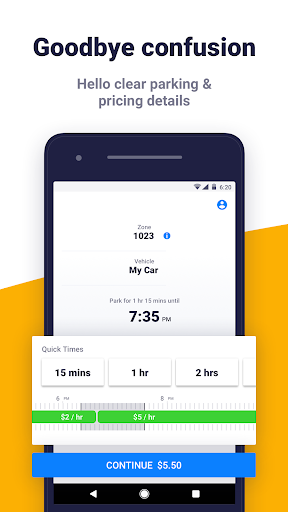
Getting started is straightforward. Download the app from the Google Play Store, create a free account by entering your email address and setting a password, and add at least one vehicle by providing its license plate number and state or province. When you park, look for the orange-and-white Passport Parking signs or decals on the nearby meter or post. Each zone has a unique four‑ or five‑digit number. Open the app and tap “Park Now,” then enter the zone number. The app will display the hourly rate and any time limits. Choose how long you wish to stay—you can start with a shorter session and extend later if needed. Select your vehicle from your saved list, and confirm the payment method (credit card, debit card, or wallet balance if available). Once paid, the app shows a countdown timer and your parking status. You can close the app; the timer runs in the background. Before your time expires, you will receive a push notification (if enabled) reminding you to extend. To extend, just open the app, select your active session, and add more time subject to local maximum limits. When you are done, you can end the session early (no refunds are typically issued, but you can avoid paying for unused time by not extending). The entire process takes less than 30 seconds once you are familiar with it. The app also offers a map view that shows nearby parking zones and their current rates, making it easier to plan where to park before you arrive.
Tips and Tricks for a Smooth Experience
To get the most out of Passport Parking, keep a few best practices in mind. First, make sure your notification settings are turned on. The reminder can be a lifesaver, especially if you are in a meeting or exploring a museum. Second, always double-check the zone number before paying. Entering the wrong zone could result in a ticket. If you are unsure, look for multiple signs nearby—they typically display the same number. Third, if you have multiple vehicles in your account, verify that you have selected the correct one for the current session. You do not want to accidentally pay for a car that is not parked in that zone. Fourth, consider adding a backup payment method (like a second credit card) in case your primary card fails. The app allows you to store multiple cards securely. Fifth, if you are parking in a city that supports it, look for the “extend from notification” feature: when you get the reminder, you can tap directly on the notification to extend without opening the app fully. Finally, check the app periodically for updates. New features, supported cities, and improvements are rolled out regularly. If you travel frequently, you will appreciate how many locations are covered. Always check the in‑app map or search for your destination to confirm coverage before relying on it. With these simple habits, Passport Parking becomes a natural part of your daily routine.
Say goodbye to parking stress. Passport Parking puts a reliable digital parking meter in your pocket, saving you time, money, and frustration. Whether you are a daily commuter, a weekend shopper, or a road‑trip traveler, this app makes parking simple, contactless, and entirely under your command. Download Passport Parking today from the Google Play Store and experience the modern way to park.