| Title | Microsoft Teams |
| Version | Varies with device |
| Price | Free |
| Category | Common |
| Package | com.microsoft.teams |
In today’s fast-paced digital workplace, seamless communication and collaboration are no longer optional — they are essential. Microsoft Teams, developed by Microsoft Corporation, has emerged as the definitive hub for teamwork, bringing together chat, video meetings, file storage, and app integration into a single, unified platform. Whether you are managing a small startup or coordinating across a multinational enterprise, Microsoft Teams empowers your organization to stay connected, productive, and agile — no matter where your team members are located.
At its core, Microsoft Teams is designed to streamline the way people work. It replaces disjointed email threads, scattered file shares, and multiple communication apps with a centralized workspace. With deep integration into Microsoft 365 (formerly Office 365), Teams leverages the power of Word, Excel, PowerPoint, SharePoint, and OneDrive to create a cohesive ecosystem. The app is available on Android, so you can take your entire hub with you on your mobile device. From instant messaging to full-fledged video conferences, Microsoft Teams provides the tools you need to collaborate in real time, reduce context switching, and accelerate decision-making.
As remote and hybrid work models become the norm, the demand for reliable, secure, and feature-rich collaboration tools has skyrocketed. Microsoft Teams meets this demand with enterprise-grade security, compliance, and administrative controls, while also offering a user-friendly interface that any team member can adopt quickly. The mobile app brings the full desktop experience to your pocket, ensuring that you never miss an important update or a critical discussion, even when you are away from your desk. Whether you are checking in on a project channel, responding to a chat, or joining a live meeting from a coffee shop, Microsoft Teams keeps your workflow uninterrupted.
Key Features
- Unified Communication Hub: Replace multiple apps with one platform. Teams brings together persistent chat, audio calls, video meetings, and file sharing, all accessible from one intuitive interface. You can switch between private chats, group conversations, and channel discussions without losing context.
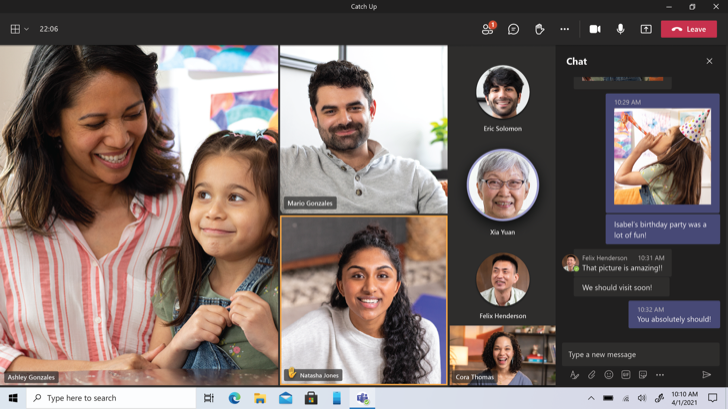
- High-Quality Video and Audio Meetings: Host or join meetings with up to 300 participants (and up to 10,000 with Live Events). Enjoy crisp audio, HD video, background blur, and screen sharing that make virtual meetings almost as productive as in-person ones. The mobile app supports seamless transitions from chat to meeting with a single tap.
- Deep Microsoft 365 Integration: Work directly within Teams on Word documents, Excel spreadsheets, and PowerPoint presentations. Co-author files in real time, share them via OneDrive, and access SharePoint document libraries without leaving the app. All your favorite Office tools are just a click away.
- Team Channels and Tabs: Organize your work into channels dedicated to specific projects, topics, or departments. Use tabs to pin important files, apps, or webpages directly inside a channel, making it easy for everyone to find and access what they need.
- Enterprise-Grade Security and Compliance: Microsoft Teams is built on the Microsoft 365 security framework, offering data encryption at rest and in transit, multi-factor authentication, and compliance with industry standards such as HIPAA, GDPR, and ISO 27001. Your business data remains protected.
- Powerful Search and Notifications: Find messages, files, and people instantly with cross-platform search. Customize notifications so you stay informed about priority conversations without being overwhelmed. The mobile app supports rich notifications, allowing you to reply or take action directly from the notification drawer.
- Extensible Platform with Apps and Bots: Enhance your workflow by adding third-party apps and custom bots. Integrate tools like Trello, Asana, Salesforce, or ServiceNow directly into Teams. Build your own bots using the Microsoft Bot Framework to automate routine tasks and improve efficiency.
Why Choose Microsoft Teams?
Microsoft Teams stands out in the crowded collaboration market because it is not just another messaging app — it is an entire workspace. Unlike standalone tools that force you to juggle between chat, email, and file storage, Teams consolidates everything into a single, searchable, and persistent environment. This reduces the cognitive load on employees and minimizes the time wasted switching between applications. For organizations already invested in the Microsoft ecosystem, Teams seamlessly extends the value of Office 365, Azure Active Directory, and other Microsoft services. But even if you are using other platforms, Teams offers open APIs and connectors to bridge the gap.
Another powerful reason to choose Microsoft Teams is its scalability. From a team of five to an enterprise with thousands of users, Teams adapts. The mobile app is optimized for both phones and tablets, providing a consistent experience across devices. You can participate in meetings, view shared screens, and edit files collaboratively — all from your Android device. The app also includes offline capabilities, so you can draft messages and even edit documents without an internet connection; your changes sync automatically when you reconnect. This flexibility is crucial for field workers, consultants, and anyone who needs to stay productive on the go.
Moreover, Microsoft continuously innovates its collaboration tools. Regular updates bring new features such as Together Mode (which uses AI to place meeting participants in a shared virtual space), breakout rooms, custom backgrounds, and live captions. These features are designed to make virtual interactions more engaging and inclusive. The mobile app benefits from many of these advancements, ensuring that mobile-first users are not left behind. With Microsoft Teams, you are not just adopting a product — you are joining a platform that evolves with the future of work.
Tips and Tricks for Better Collaboration
To get the most out of Microsoft Teams on your Android device, start by organizing your teams and channels thoughtfully. Use the mobile app to pin your most frequently used channels and chats at the top of the list for quick access. Swipe right on a chat or channel to access options like mute, mark as read, or set custom notifications. This helps you focus on what matters most without getting distracted by less important conversations.
Leverage the power of tags and @mentions to direct messages to specific individuals or groups. When you need to get someone’s attention urgently, type @ followed by their name. For a whole team or role, create custom tags (like “@Managers” or “@Developers”) so you can notify the right people with a single mention. The mobile app also supports quick replies and emojis, but to maintain professionalism in business communication, use the formatting toolbar to bold, italicize, or bullet your messages when appropriate.
Make the most of the meeting experience on your phone. Before joining a video meeting, test your audio and video by tapping your profile picture and selecting “Devices.” Use background effects to blur your surroundings or replace them with a professional image — this is especially useful when joining from a busy location. When screen sharing from a mobile device, you can choose to share your entire screen or a specific app, making it easy to walk colleagues through a document or presentation. For longer meetings, consider using landscape orientation and enabling call merging if you need to combine calls from your carrier and Teams.
Finally, integrate your daily workflows. Connect your calendar to Teams so you can see upcoming meetings and join them with one tap. Use the mobile app to approve documents, respond to Shifts schedules, or chat with a colleague while reviewing a PowerPoint slide. By setting up notifications intelligently — turning off alerts for channels that are not critical — you can maintain a healthy work-life balance while staying productive. Remember that the Teams mobile app is designed to complement, not replace, your desktop experience; use it for quick check-ins, urgent updates, and on-the-move collaboration.
In conclusion, Microsoft Teams is more than a communication tool — it is the nerve center of modern teamwork. By bringing together messaging, meetings, files, and apps in a secure and scalable environment, it enables organizations to work smarter, faster, and more inclusively. The Android app puts this power directly in your pocket, ensuring that you can stay connected and productive wherever your work takes you. Whether you are leading a global project or simply trying to coordinate with a few colleagues, Microsoft Teams provides the foundation for effective collaboration. Download Microsoft Teams today and experience the future of business communication.