| Title | Lowe's |
| Version | 22.11.1 |
| Price | Free |
| Category | Common |
| Package | com.lowes.android |
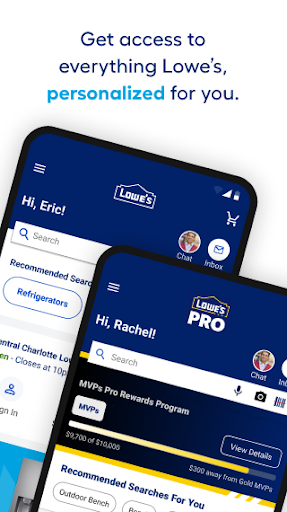
Whether you’re tackling a full kitchen remodel, sprucing up your garden, or simply replacing a light bulb, the Lowe’s app puts everything you need right in your pocket. Developed by Lowe’s Companies, Inc., this official Android shopping companion seamlessly connects you to one of the largest home improvement retailers in the United States. From browsing millions of products to checking real-time store inventory and managing your orders, the app transforms your smartphone into a powerful tool for every project. With integrated features like barcode scanning, project ideas, and loyalty rewards, the Lowe’s app saves you time, money, and trips to the store. Whether you’re a seasoned DIYer or a first-time homeowner, this app helps you shop smarter, plan better, and get more done.
Key Features
- Intelligent Product Search & Barcode Scanner – Find exactly what you need by typing keywords, speaking naturally, or scanning product barcodes right in the aisle. The app returns detailed specs, customer reviews, and current pricing instantly, so you never have to guess.
- Real-Time Store Inventory Check – Before you drive to the nearest Lowe’s, check product availability in your local store. The app shows exact shelf quantities, aisle location, and even lets you reserve items for in-store pickup.
- Order Management & Flexible Fulfillment – Whether you choose free store pickup, curbside pickup, or home delivery, track every order from placement to “ready for pickup” status. You can also view past purchases, reorder favorites, and split orders across multiple stores.
- MyLowe’s Rewards & Special Offers – Earn points on every purchase and redeem them on future buys. The app automatically syncs your rewards account, displays exclusive app-only deals, and notifies you about personalized promotions and clearance events.
- Project Ideas & How‑To Guides – Stuck on a renovation decision? Browse thousands of curated project photos, step‑by‑step guides, and product recommendations. The app even lets you save your favorite ideas to custom lists for later reference.
- Easy Reordering & List Creation – Keep your shopping organized by creating multiple lists (e.g., “Backyard Patio” or “Bathroom Updates”). With a single tap, you can add items from your history or current browsing to a list, and then share them with family or contractors.
- Store Locator & Services Scheduling – Find the nearest Lowe’s with hours, services (like key cutting or paint mixing), and contact info. You can also book appointments for in‑store consultations or installation services directly through the app.
Why Choose the Lowe’s App?
Home improvement projects often involve multiple trips, price comparisons, and unexpected hurdles. The Lowe’s app streamlines the entire process by putting the store’s full inventory, pricing, and expertise at your fingertips. Unlike generic shopping apps, this tool is built specifically for the way DIYers and pros shop: it lets you check stock before leaving the house, scan items on the go, and seamlessly switch between online browsing and in‑store purchasing. The integration with MyLowe’s Rewards means you never miss out on points or discounts, and the project ideas section inspires you to take on new challenges with confidence.
Another standout advantage is the app’s ability to combine online convenience with the trust of a physical store. You can research products thoroughly at home, then pick them up same‑day from your local Lowe’s—often within an hour. For larger items like appliances or lumber, home delivery is just a few taps away. The app also syncs with your Lowe’s account, so your warranty information, purchase history, and receipts are always accessible. This level of integration saves you time, reduces frustration, and helps you stay on budget.
Tips & Tricks for Getting the Most Out of the App
To truly maximize the Lowe’s app, start by enabling location permissions. This allows the app to automatically detect your nearest store and show accurate inventory and pricing. When shopping in‑store, use the barcode scanner feature to quickly check if an item is on clearance or if a competitor offers a lower price (Lowe’s often matches competitors). You can also scan shelf tags to see alternative sizes or colors that might not be immediately visible.
Another useful strategy is to create a “Project List” before you begin shopping. For example, if you’re painting a room, add paint, primer, brushes, tape, drop cloths, and rollers to a single list. The app will show you the total cost and let you mark items as purchased as you go. This helps you stick to your budget and avoid impulse buys. Additionally, take advantage of the “Price Check” feature while in the store: scan any barcode and the app displays the price, as well as any applicable coupons or bulk discounts.
Don’t forget to explore the “Savings” tab regularly. Lowe’s frequently offers app‑exclusive coupons, seasonal sales, and flash deals that aren’t available on the website. You can also set up notifications for price drops on items you’ve saved to a wishlist. For larger projects that require professional installation (e.g., flooring, cabinets, or water heaters), use the “Services” section to schedule a free in‑home consultation or get a quote—all without making a phone call.
Who Will Love the Lowe’s App?
This app is designed for anyone who shops at Lowe’s, whether you’re a weekend warrior, a property manager, or a contractor running multiple jobs. Beginners will appreciate the project ideas, how‑to videos, and easy reordering of consumables like paint and caulk. Seasoned DIYers can benefit from the inventory checker and barcode scanner to speed up supply runs. For professionals, the app supports loyalty rewards on large purchases, quick reordering of job‑site essentials, and the ability to manage multiple orders across different store locations. Even if you rarely shop for home improvement, the app is handy for emergencies—need a new sump pump or a smoke alarm battery? Check stock and reserve it in minutes.
Download the Lowe’s app today and experience a smarter way to shop for your home and garden. With its powerful search, real‑time inventory, and integrated rewards, it’s the only tool you need to turn any project from a chore into a success. Whether you’re planning a big renovation or just running a quick errand, let the Lowe’s app handle the heavy lifting so you can focus on creating the space you love.