| Title | Notepad - notes & memo app |
| Version | 2.7 |
| Price | Free |
| Category | Common |
| Package | com.komorebi.memo |
In a world overflowing with complex productivity suites and bloated applications, sometimes all you really need is a clean, distraction-free space to jot down your thoughts. Notepad - notes & memo app by Komorebi Inc. is precisely that: a lightweight, lightning-fast note-taking tool designed for simplicity and speed. Whether you are capturing a sudden burst of inspiration, drafting a quick shopping list, or saving an important phone number, this app gets out of your way and lets you write. It strips away unnecessary clutter, offering a straightforward interface where every tap feels intuitive. You open the app, type, and save – that is the core experience, refined to perfection. Behind this minimalism lies thoughtful engineering: notes are stored locally on your device by default, ensuring your private thoughts remain private. No account required, no syncing prompts nagging you. For users who want a no-nonsense digital notepad that feels as natural as scribbling on paper, Notepad - notes & memo app delivers exactly what it promises.
Key Features
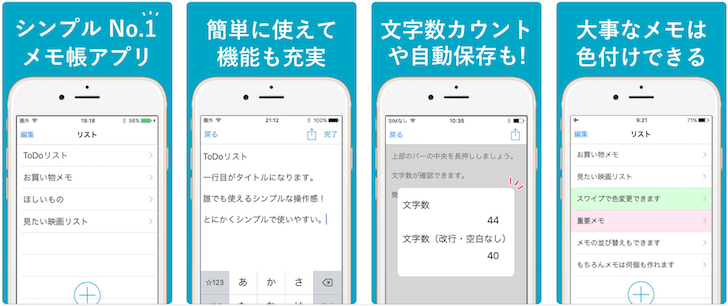
- Instant note creation – Launch the app and start typing immediately. There is zero learning curve. The home screen presents a clean list of your notes, and a prominent “+” button lets you create a new memo in one tap. You can even use the widget to add a note directly from your home screen without opening the app.
- Organize with ease – Keep your notes tidy using folders and labels. Create custom categories like “Work,” “Personal,” or “Ideas” and assign notes with a single tap. Need to find something fast? The built-in search bar scans titles and content instantly, so you never lose a thought.
- Rich text formatting – While the app values simplicity, it doesn’t skimp on essentials. Bold, italic, underline, strikethrough, bullet lists, and numbered lists are all supported. You can also change font size and color to highlight important parts. For memo-style notes, you can even add checkboxes to create to-do lists that you can check off as you go.
- Protect your privacy – Sensitive notes can be locked with a PIN or device biometrics (fingerprint / face unlock). The app uses encrypted local storage by default, and there are no cloud servers involved unless you explicitly enable backup. Your data stays on your phone, under your control.
- Customizable appearance – Choose from a variety of themes: light, dark, or a selection of accent colors. Adjust the text size and line spacing to match your reading comfort. You can also set a default sorting order (by date created, modified, or alphabetically) and choose between list view or grid view for your notes.
- Backup & restore – Even without forced cloud sync, you can manually back up all your notes to a local file (plain text or JSON). This file can be transferred to another device or stored in your favorite cloud service (like Google Drive or Dropbox) for safekeeping. Restoring is just as simple – import the file and your notes reappear.
- Widgets and shortcuts – Speed up your workflow with home screen widgets that display recent notes or a quick note input field. You can also create app shortcuts for specific folders or frequently used tags. The app integrates with Android’s share menu, so you can send text from any app directly into a new note.
Why Choose Notepad Over Other Note Apps?
There are hundreds of note-taking apps on the Play Store, but Notepad - notes & memo app stands out for its deliberate focus on being a digital notepad, not a project management tool. Many competitors try to do too much – collaboration, databases, drawing, voice memos – and in doing so, they become overwhelming for everyday quick notes. Komorebi Inc. built this app for the user who values speed over feature lists. It launches in milliseconds, uses minimal battery and storage, and never sends your data anywhere unless you decide to back it up manually.
Another critical advantage is its offline-first design. You never need an internet connection to create, view, or edit your notes. That means you can use it in airplane mode, on a subway, or in a remote cabin. For privacy-conscious users, this is a game-changer. Moreover, the app respects Android’s system settings for dark mode and dynamically adjusts its theme. It is fully accessible with TalkBack support, making it usable for visually impaired users who need a straightforward note editor.
The developer, Komorebi Inc., has a reputation for creating tools that are “boring” in the best way – they just work, without crashes or surprises. Updates focus on stability and performance rather than adding flashy features that complicate the experience. If you have ever been frustrated by a note app that suddenly required an account or started showing ads, you will appreciate the clean, ad-free environment of Notepad. There is no tracking, no analytics, no permissions that ask for your contacts or location. The app only requests storage permission if you choose to attach images or files, and camera permission for scanning documents – and each permission is requested at the moment it is needed, with a clear explanation.
Tips and Tricks to Get the Most Out of Notepad
Although the app is designed to be intuitive, a few smart practices can help you organize your notes more effectively. First, take advantage of folders right from the start. Instead of letting all notes accumulate in one long list, create a folder for each major area of your life: “To-Do,” “Journal,” “Recipes,” “Work Notes,” etc. You can create a new folder by tapping the folder icon on the top bar and selecting “Add Folder.” Drag and drop notes between folders or use the move option from the note’s menu.
Second, use the search function like a pro. Even if you have hundreds of notes, the search field at the top of the main screen will filter both titles and content in real time. To narrow results further, you can search within a specific folder by opening that folder first. Also, consider using tags (if enabled) – you can add multiple tags to a note, such as #urgent, #reading, #ideas, and then search by tag name to see all related notes.
Third, enable the lock feature for notes containing sensitive information (passwords, personal data, financial info). To lock a note, open it, tap the three-dot menu in the top right, and select “Lock.” You will be prompted to set a PIN or use your fingerprint. Once locked, the note’s title and preview will be hidden in the list view, and you will need authentication to open it. This is especially useful if you share your phone with family members or if you want an extra layer of security.
Fourth, make regular backups a habit. Tap the menu icon (three lines) on the top left, select “Settings,” then “Backup & Restore.” Choose “Backup to file” and save the .json or .txt file to a location you can remember, or upload it to a cloud drive. Do this once a week to ensure you never lose your notes if your device is lost or damaged. The restore process is equally simple – just tap “Restore from file” and navigate to your backup.
Finally, explore the widgets. Long-press your home screen, select “Widgets,” and look for the Notepad widget. You can choose a widget that shows your most recent note, or a “Quick Note” widget that opens a blank note with a single tap. Place it on your home screen for lightning-fast capture. If you use the app for to-do lists, the “Checklist” widget can display an interactive list that you can check off without opening the app.
Closing Thoughts
In a market crowded with note-taking apps that try to be everything to everyone, Notepad - notes & memo app is a refreshing return to basics. It is the kind of app you install, use without thinking, and wonder how you ever managed without it. Whether you need a quick scratchpad for grocery lists, a secure vault for journal entries, or a simple text editor for drafting ideas, this app handles it all with grace and speed. No ads, no accounts, no fuss. Download Notepad - notes & memo app today and experience the joy of distraction-free note-taking. Your thoughts deserve a clean canvas – this is it.