| Title | Google Lens |
| Version | Varies with device |
| Price | Free |
| Category | Common |
| Package | com.google.ar.lens |
Google Lens is a powerful visual search and augmented reality tool developed by Google LLC. It transforms your smartphone camera into an intelligent assistant that can understand, analyze, and interact with the world around you. Whether you need to translate a foreign menu, identify a mysterious plant, scan a barcode, copy printed text into your phone, or even solve a complex math equation, Google Lens does it all in real time. By combining advanced artificial intelligence, computer vision, and Google’s vast knowledge graph, this app lets you simply point, tap, and discover. It’s not just a camera app—it’s a gateway to instant information, hands-free learning, and seamless productivity. With Google Lens, every object, sign, or landmark becomes a starting point for deeper exploration.
Key Features
- Real-Time Text Translation – Point your camera at any foreign language sign, menu, or document and see instant translations overlaid on the original text. Supports over 100 languages, making travel, study, and international communication effortless.
- Smart Text Selection and Copy – Scan printed or handwritten text from books, posters, notes, or screens and copy it directly to your device. You can then paste it into a document, search engine, or message—even call a phone number or open a URL with one tap.
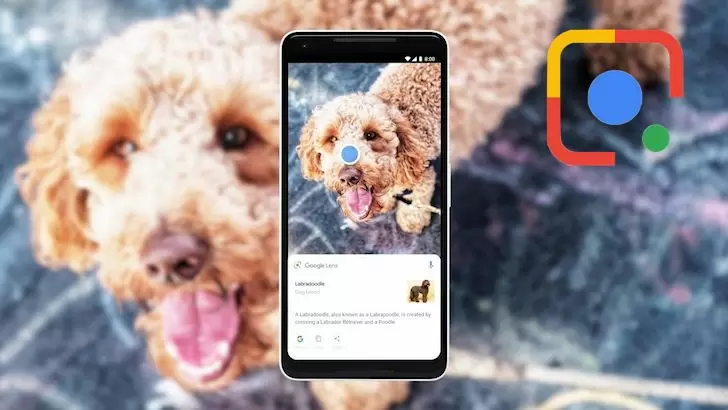
- Plant and Animal Identification – Snap a photo of a flower, leaf, mushroom, or a pet, and Google Lens identifies the species for you. It’s a perfect companion for gardeners, hikers, nature lovers, and curious minds wanting to learn more about their surroundings.
- Product and Barcode Scanning – Scan a product barcode, QR code, or packaging to instantly find search results, pricing, reviews, and where to buy it online or nearby. Great for shopping comparisons and inventory management.
- Landmark and Place Recognition – Capture a photo of a famous building, monument, or neighborhood and get detailed information about its history, architecture, opening hours, and nearby attractions. Ideal for travelers and explorers.
- Homework Help and Problem Solving – Take a picture of a math problem, physics equation, or written question to receive step-by-step explanations, similar examples, and relevant web results. It's like having a tutor in your pocket.
- Visual Search for Clothes, Furniture, and More – Find where to buy items you see in real life or in images. Snap a photo and Google Lens shows you similar products from online stores, along with prices and availability.
Why Choose Google Lens?
Google Lens stands out because it’s deeply integrated with Google’s ecosystem, including Google Search, Google Photos, Google Assistant, and the Google app. This means you can access its features almost anywhere—from your camera app, within the Google app, or directly from photos you’ve already taken. The recognition engine is continuously updated with machine learning models that improve accuracy over time. Unlike many single-purpose scanner apps, Google Lens combines text recognition, object identification, translation, and search into one seamless experience. It’s free, built by one of the most trusted names in technology, and works offline for several core functions like text scanning and math solving. Whether you’re a student, a traveler, a professional, or just someone who loves discovering new things, Google Lens makes your phone smarter and your daily tasks easier.
How to Use Google Lens
Using Google Lens is remarkably simple. Download the app from the Google Play Store, open it, and grant camera permissions. Then just point your camera at any object, text, or area you want to learn about. Tap on the screen to focus, and Lens will analyze the scene in seconds. Depending on what it sees, it may show a translation overlay, a text scanning option, product information, or a list of similar images. You can also tap the “Search” button to run a more detailed visual search. For a hands-free experience, activate Google Assistant and say “Hey Google, Lens” to open the viewfinder directly. Additionally, any photo in your Google Photos library can be opened with Lens by tapping the Lens icon. The app works both online and offline for many features like QR and barcode scanning, text copying, and math solving—just make sure to download offline language packs if needed.
Tips and Tricks for Better Results
To get the most out of Google Lens, ensure good lighting and a steady hand when capturing an image. For text recognition, try to capture the entire word or phrase in a single frame. If the app struggles with handwriting or complex fonts, zoom in to fill the screen. For translations, you can tap on the result to hear the pronunciation or copy the translated text. When scanning products, Lens often shows multiple shopping links—tap “Show more” to compare prices across retailers. For identifying plants, a clear photo of the leaf or flower, rather than the whole plant, yields better accuracy. Remember that you can also use Lens on screenshots and images from your gallery, making it easy to analyze content you find on social media or the web. Experiment with the “Homework” mode to solve equations—simply highlight the problem and choose the “Homework” option from the bottom menu. Over time, the app learns from your usage to personalize suggestions and improve recognition.
Google Lens is more than just a utility—it’s a window to instant knowledge and greater productivity. By turning your everyday camera into a visual search engine, it saves you time, reduces language barriers, and helps you make informed decisions. Whether you’re translating a street sign while traveling, copying a recipe from a magazine, or finding out what kind of tree is in your backyard, Google Lens delivers accurate results in seconds. It’s the kind of tool that once you start using, you wonder how you ever managed without it. Download Google Lens today and see the world in a whole new light.