| Title | YouTube TV: Live TV & more |
| Version | 6.45.5 |
| Price | Free |
| Category | Common |
| Package | com.google.android.apps.youtube.unplugged |
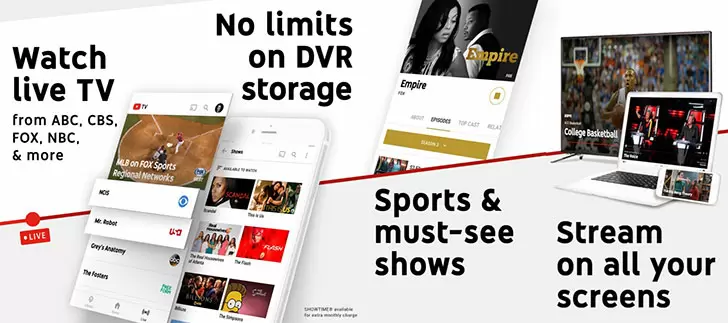
In a world where cord-cutting has become the norm, finding a streaming service that delivers live television without sacrificing convenience, variety, or reliability can be a challenge. YouTube TV: Live TV & more, developed by Google LLC, answers that call with a comprehensive live TV streaming platform that brings over 100 channels right to your Android device. Whether you’re a sports fanatic, a news junkie, or a family looking for a flexible alternative to cable, YouTube TV offers a robust lineup that includes major broadcast networks, popular cable channels, and premium add-ons — all accessible from your phone, tablet, or TV via Chromecast. The service is built around a cloud DVR with unlimited storage, meaning you never have to worry about missing your favorite shows, games, or live events again. With an intuitive interface, personalized recommendations, and the ability to stream on up to three devices simultaneously, YouTube TV transforms your mobile device into a powerful entertainment hub. This isn’t just another streaming app; it’s a complete replacement for traditional cable, designed for the way we watch TV today.
Key Features
- Extensive Live Channel Lineup – Access over 100 channels including local ABC, CBS, FOX, NBC, and cable favorites like ESPN, CNN, HGTV, FX, and many more. You get the most popular networks for news, sports, entertainment, and family programming right at your fingertips.
- Unlimited Cloud DVR – Record as many shows and movies as you want with no storage limits. Your recordings are stored for up to nine months, and you can fast-forward through commercials. It’s the ultimate in catch-up convenience.
- Six Accounts per Household – Share your subscription with up to six family members, each with their own personalized DVR library, recommendations, and watch history. Everyone gets their own experience under one plan.
- Simultaneous Streaming – Watch on up to three different devices at the same time. No more fighting over the TV – everyone can stream their own content on their preferred screen.
- Content Library with Thousands of Titles – Beyond live TV, enjoy a growing on-demand library of shows and movies from networks like AMC, TNT, and more. It’s a perfect complement to the live service.
- Premium Add-Ons – Enhance your subscription with optional channels such as HBO Max, Showtime, Starz, and NBA League Pass. You can add or remove these at any time without long-term contracts.
- Seamless Integration with YouTube – The app is deeply integrated with the main YouTube platform, allowing you to switch seamlessly between live TV and your favorite YouTube channels, all within a single interface.
Why Choose YouTube TV?
YouTube TV stands out in the crowded streaming market because it combines the breadth of traditional cable with the flexibility of modern digital services. Unlike many competitors that offer limited DVR capacity or restrict concurrent streams, YouTube TV gives you unlimited cloud recording and three simultaneous streams right from the start. This makes it an ideal choice for families with diverse tastes – kids can watch cartoons in one room while parents catch up on live news or a sports game in another. The user interface is clean and intuitive, prioritizing live content while also surfacing on-demand options. You can browse by genre, search for specific shows, or use the “Top Picks for You” section to discover new favorites based on your viewing history.
Another major advantage is the absence of hidden fees. What you see is what you pay: no equipment rental charges, no installation costs, and no long-term contracts. You can cancel or change your plan at any time. This transparency, combined with the ability to record unlimited content, means you’ll never miss a moment of live television – whether it’s a breaking news event, a championship game, or a season finale. The service also works seamlessly across devices: start watching on your phone during your commute, then continue on your TV at home with Chromecast or a smart TV app. And with dedicated apps for Android tablets and Android TV, the experience is consistent and polished.
How to Get Started
Getting started with YouTube TV is simple and takes just a few minutes. First, download the YouTube TV app from the Google Play Store on your Android device. Open the app and tap “Try it free” – you’ll be prompted to sign in with your Google account. The service offers a free trial period (typically 7 days) so you can explore the full channel lineup and features risk-free. After signing up, choose your base plan (the standard subscription includes over 100 channels) and optionally add any premium networks you desire. The app will then guide you through setting up your personalized experience, including selecting your favorite shows and sports teams for tailored recommendations. You can start watching live TV immediately, set up recordings for upcoming programs, or browse the on-demand library. For the best experience, ensure your internet connection is stable – YouTube TV recommends a minimum of 3 Mbps for standard definition and at least 8 Mbps for HD streaming. You can also adjust video quality in settings to manage data usage on mobile networks.
Tips and Tricks for Power Users
To make the most of YouTube TV, take advantage of the DVR features fully. Even if you only plan to watch live, it’s a good idea to record shows you might enjoy – recordings are accessible for nine months, and you can skip ads. Use the “Library” tab to organize your recordings by shows, movies, sports, and events. You can also create a “Watchlist” to mark shows you want to catch up on later. For sports fans, the app lets you follow specific teams or leagues; you’ll receive notifications when games are about to start and can easily add them to your DVR. Another handy tip: use the “Search” function to find actors, directors, or keywords – the results include both live and on-demand content from your subscriptions and add-ons. Finally, don’t forget that YouTube TV supports voice commands on Android TV and Google Home devices, so you can change channels, search for content, or control playback hands-free. And if you ever travel outside your home area, YouTube TV allows temporary location changes for watching local channels while you’re away – a feature that frequent travelers will appreciate.
In an era of endless streaming choices, YouTube TV delivers a balanced, feature-rich solution that respects your time and money. With its massive channel selection, unlimited DVR, and multi-user support, it’s designed to replace cable without the headaches. The app’s clean design and Google’s reliable infrastructure ensure a smooth experience whether you’re catching a live game, following breaking news, or binging a new series. If you’re ready to cut the cord without sacrificing quality or convenience, download YouTube TV: Live TV & more today and take control of your live television experience. Your next favorite show is just a tap away.