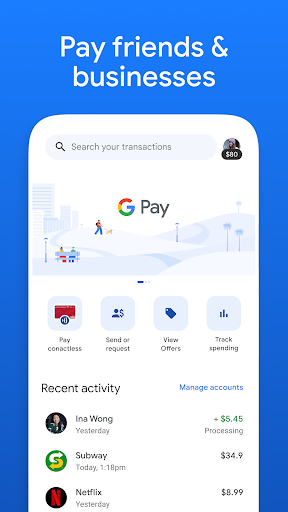
| Title | Google Pay: Save and Pay |
| Version | Varies with device |
| Price | Free |
| Category | Common |
| Package | com.google.android.apps.nbu.paisa.user |
Google Pay: Save and Pay is a powerful mobile payment and financial management app developed by Google LLC. It streamlines everyday transactions, from contactless in-store payments to seamless online purchases, while also helping users track their spending, save money, and earn rewards. By integrating secure UPI-based transfers, bill payments, and cashback offers into a single intuitive interface, Google Pay makes managing your finances faster, safer, and more rewarding. Whether you are splitting a dinner bill, paying your utility bills, or shopping at your favorite stores, this app delivers a unified and hassle-free experience.
Key Features
- Contactless Tap to Pay: Use your phone or smartwatch to pay at any contactless terminal. Google Pay uses NFC technology and tokenized payment methods, ensuring your card details are never shared with the merchant. Just unlock your device, tap, and go – no wallet required.
- UPI-Powered Transfers: Send and receive money instantly using UPI (Unified Payments Interface). With Google Pay, you can transfer funds to any UPI ID, bank account, or mobile number, even if the recipient doesn’t have the app. Transactions are processed in seconds, 24/7, with no extra fees.
- Bill Payments and Recharges: Pay your electric, water, gas, and broadband bills directly from the app. Set up automatic reminders or schedule one-time payments. You can also recharge prepaid mobile, DTH, and data plans – all in one place.
- Rewards and Cashback: Earn Scratch Cards and instant cashback on eligible transactions. Google Pay regularly features exclusive deals from partner merchants, such as discounts on grocery orders, fuel station payments, and online shopping. Accumulated rewards are automatically credited to your bank account or can be used for future payments.
- Expense Tracking and Insights: The app automatically categorizes your transactions (e.g., groceries, utilities, entertainment) and provides monthly spending summaries. Visual charts help you understand where your money goes, making it easier to set budgets and identify saving opportunities.
- Multi-Layered Security: Google Pay is protected by Google’s advanced security infrastructure. Every transaction requires your device unlock (PIN, pattern, password, or biometric), and payment data is encrypted end-to-end. The app also supports remote lock or wipe if your device is lost.
- Integration with Google Ecosystem: Sync your payment information with Google Account for a personalized experience. Receive expense notifications on your smartwatch, use Google Assistant for voice-initiated payments, and manage subscriptions through Google Pay’s dashboard.
Why Choose Google Pay: Save and Pay
Google Pay stands out for its simplicity, reliability, and deep integration with the Google ecosystem. Unlike many payment apps that focus solely on transactions, Google Pay also helps you save money actively. The “Save” feature allows you to set aside small amounts automatically – for example, rounding up purchases to the nearest dollar and depositing the difference into a dedicated savings account. Over time, these micro-savings grow without requiring any extra effort on your part.
The app is built with security at its core. Google Pay uses tokenization, which replaces your actual card number with a unique digital token for each transaction. Your financial data never leaves your device in plain text, and you can review permissions and transaction history at any time. In case of fraud, Google’s 24/7 fraud monitoring and buyer protection policies give you peace of mind.
Another key advantage is the sheer reach of UPI. With Google Pay, you can pay anyone who has a bank account in India (and select other supported countries), even if they don’t have the app. The app also supports merchant payments at millions of partner stores worldwide, including major retail chains, online platforms, and small businesses. No other single app offers such a broad acceptance network combined with Google-level reliability.
How to Get Started
Setting up Google Pay: Save and Pay is straightforward. Download the app from the Google Play Store and open it. You will be asked to sign in with your Google Account and verify your phone number. Next, choose your bank from the list of supported institutions and link a UPI-enabled bank account. The app will send a one-time verification SMS (at no cost) to confirm your number. After that, set a secure payment method (PIN, pattern, or biometric). Your first transaction might require a bank-side verification, but subsequent payments are seamless.
Once set up, you can immediately start making payments. To pay in a store, simply unlock your phone and hold it near the contactless reader – no app need to be open. For online payments, select Google Pay as the payment method at checkout and authenticate with your fingerprint or device PIN. Sending money to a friend is as easy as entering their UPI ID or mobile number and confirming the amount.
Tips and Tricks for Maximizing Google Pay
To get the most out of Google Pay, enable all notifications so you never miss a cashback offer or a bill due date. Check the “Deals” section regularly – Google frequently updates exclusive offers that can save you 10–20% on everyday purchases. Use the “Reminders” feature to schedule recurring bills (e.g., rent, subscriptions) so that payments happen automatically, avoiding late fees.
Take advantage of the savings toolkit. Set a weekly savings goal (e.g., “Save $5 every week”) and Google Pay will automatically transfer that amount from your checking to a designated savings account. You can also round up all purchases to the next dollar, building savings effortlessly. For businesses and freelancers, Google Pay’s transaction history can be exported for accounting purposes – simply go to the “History” tab and download a CSV file.
If you frequently travel abroad, note that Google Pay works with partner merchants in many countries. For international transfers, UPI is not supported outside India, but you can still use Google Pay for in-store contactless payments where Visa/Mastercard/NFC payments are accepted (via linked card). Always check your bank’s foreign transaction fees before traveling.
Finally, make sure you keep the app updated. Google regularly rolls out new features, including improvements to the savings module, expanded merchant integrations, and enhanced security protocols. Updates are free and typically add more value without requiring any action from you.
Security and Trust
Google Pay: Save and Pay has been designed with privacy and security as its foundation. Google does not sell your transaction data to third parties, and you are in full control of what information is shared. The app complies with industry standards such as PCI DSS and uses machine learning to detect suspicious activity. If you ever notice an unauthorized transaction, you can report it directly in the app, and Google’s dedicated support team will assist you. Additionally, you can enable the “Require device unlock for payments” option for an extra layer of protection.
Whether you are a student managing a tight budget, a professional juggling multiple payments, or someone simply looking for a smarter way to handle money, Google Pay: Save and Pay offers a complete, secure, and rewarding financial companion. Its combination of convenience, savings tools, and trusted technology makes it one of the most comprehensive payment apps available today. Download it now and start experiencing a smarter way to pay and save.