| Title | Google Voice |
| Version | 2022.10.31.485627509 |
| Price | Free |
| Category | Common |
| Package | com.google.android.apps.googlevoice |
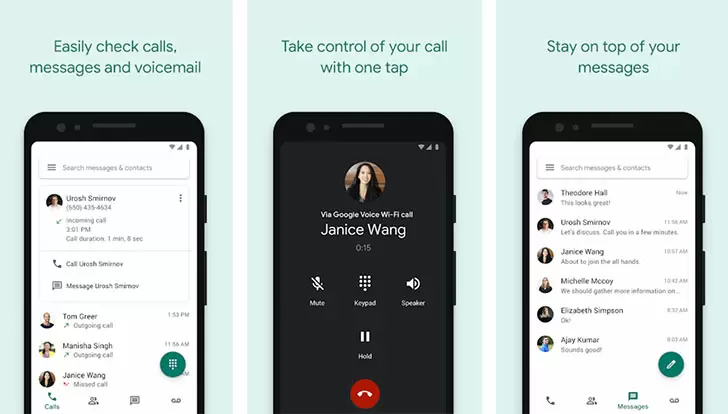
Google Voice is a versatile communication app developed by Google LLC that turns your existing phone into a smarter, more flexible device. Instead of juggling multiple numbers, Google Voice gives you a single, dedicated phone number that works across all your devices—your smartphone, tablet, laptop, or desktop. Whether you need a separate number for work, a way to keep your personal number private, or a reliable tool for screening calls and transcribing voicemails, Google Voice delivers it all. With seamless integration with other Google services and intelligent features like spam filtering and call forwarding, this app makes staying connected simple, secure, and efficient. Best of all, it offers free calling and texting within the United States, plus low rates for international calls.
Key Features
- Choose Your Own Number: Pick a new US phone number from a wide selection of area codes and local prefixes, or even port your existing number to Google Voice. This number becomes your permanent point of contact, independent of your underlying carrier.
- Smart Voicemail with Transcription: Voicemails are automatically recorded and transcribed into text so you can read them at a glance. The transcriptions are searchable, meaning you can quickly find important messages without listening to every recording.
- Call Screening and Spam Filtering: When someone calls, Google Voice can announce the caller’s name and let you decide whether to answer, send to voicemail, or block. The app automatically filters known spam calls, saving you time and keeping your phone quiet.
- Multi-Device Sync: Your calls, texts, and voicemails are synced across all your devices. Start a call on your phone and continue it on your tablet, or send a text from your computer—everything stays connected.
- Low-Cost International Calling: Make calls to other countries at competitive rates. You can add credit to your Google Voice account and call a wide range of international numbers directly from the app.
- Integration with Google Services: Works seamlessly with Gmail, Google Calendar, and Google Contacts. For example, you can place calls through Gmail, and voicemail transcripts appear in your inbox. The app also integrates with your existing contacts list.
- Customizable Call Handling: Set different greetings, forwarding rules, and ring schedules for different contacts or groups. Send specific callers straight to voicemail, route calls to multiple numbers, or turn off ringing during certain hours.
Why Choose Google Voice?
Google Voice is an ideal solution for anyone who wants to separate work and personal communications without carrying two phones. Use your Google Voice number for job applications, freelance clients, or online transactions, and keep your personal number private. The app also helps you manage your time: screen calls before answering, silence unknown numbers, and let voicemail handle the rest. Because everything is cloud-based, you never lose your messages—even if you switch carriers or move abroad, your number and data stay with you. For international travelers, Google Voice is especially valuable: you can make calls over Wi-Fi or mobile data, avoiding expensive roaming charges while still using a US-based number.
Business users appreciate the ability to set up a professional phone system without a hardware PBX. You can forward calls to multiple people, create custom greetings for departments, and keep a transcript of all voicemails for reference. The app’s spam filtering reduces distractions, and the call screening feature lets you filter out unwanted contacts. Furthermore, Google Voice does not require a separate cellular plan—it works with any internet connection, making it a cost-effective supplement to your existing service.
How to Use Google Voice
Getting started with Google Voice is straightforward. First, install the app from the Google Play Store and sign in with your Google account. You will be asked to choose a new phone number or port an existing one. After that, you can configure your forwarding settings: select which devices should ring for incoming calls, and whether you want to screen calls or let them go straight to voicemail. You can also add contacts and assign custom ringtones or greetings to specific numbers.
Once set up, use the app to make and receive calls, send and receive text messages, and manage voicemail. The dialer works like any regular phone app, but you can also make calls directly from the app’s contact list or call log. Text messages are organized into conversations, and you can attach photos, emojis, and other media. If you prefer a desktop experience, simply visit voice.google.com from your computer to access all the same features—no extra software required.
To get the most out of Google Voice, take advantage of its advanced settings. Under “Calls,” you can enable “Do Not Disturb” for specific hours, set a custom caller ID, and adjust the ringing behavior. In “Settings,” explore the “Spam” options to review filtered calls, and manage your archived conversations to keep your inbox tidy. The “Legacy Google Voice” users will also find the familiar features like conference calling and call recording (where allowed by law) still available.
Tips and Tricks for a Better Experience
Maximize the app’s potential with a few simple tips. First, consider using Google Voice as your primary number for two-factor authentication (2FA) texts. Because it works across devices, you won’t miss important codes even if your phone is off. Second, when traveling internationally, install the app before you leave and keep it connected to Wi-Fi. You can call US numbers for free and receive calls from the US without paying international rates. Third, use the “Do Not Disturb” mode to silence calls during meetings or sleep, but still allow calls from your starred contacts to come through.
For better organization, use labels (available in the web version) to categorize conversations—such as “Work,” “Personal,” or “Bills.” This makes it easy to find specific threads later. Also, regularly review your spam folder in the app; sometimes legitimate calls get misclassified. Marking them as “Not Spam” improves future filtering. Finally, if you have multiple Google accounts, you can link each to a different Google Voice number, allowing you to manage separate lines from a single device by simply signing in and out.
Google Voice is more than just a second phone number—it’s a powerful communication hub that adapts to your lifestyle. Whether you’re a freelancer wanting to keep client calls separate, a traveler needing a stable US presence, or simply someone tired of spam calls, this app provides the intelligence and flexibility you need. With its clean interface, reliable performance, and deep integration into the Google ecosystem, Google Voice remains one of the most useful tools for modern communication. Download it today and take control of how you connect with the world.