| Title | Google Chat |
| Version | Varies with device |
| Price | Free |
| Category | Common |
| Package | com.google.android.apps.dynamite |
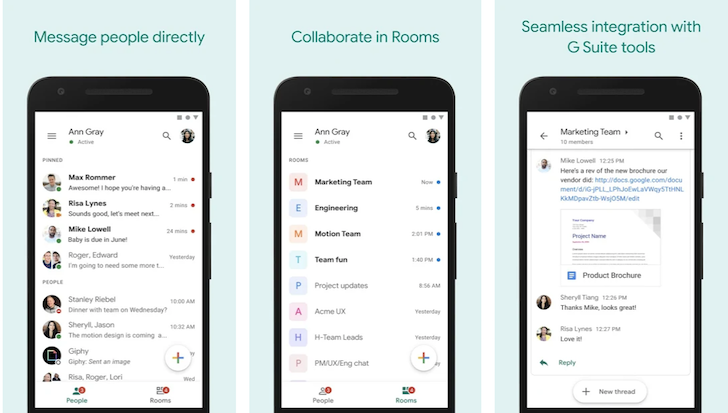
Google Chat is a powerful messaging and collaboration platform designed for teams of all sizes, from small startups to large enterprises. It is part of the Google Workspace ecosystem, seamlessly integrating with Gmail, Google Drive, Google Docs, Google Meet, and hundreds of other business tools. Unlike simple instant messaging apps, Google Chat focuses on organized, threaded conversations that keep projects moving forward without the clutter. Whether you are managing a global remote team, coordinating a marketing campaign, or just catching up with colleagues, Google Chat provides a reliable, secure, and intelligent way to communicate. With features such as direct messaging, group spaces, file sharing, and built-in video conferencing, it transforms the way teams connect and collaborate. Best of all, it works flawlessly across your phone, tablet, computer, and web browser, so you never miss a message, no matter where you are. If your goal is to improve workplace productivity and reduce email overload, Google Chat is the smart choice for modern business communication.
Key Features
- Threaded Conversations in Spaces – Keep discussions organized with topic-based threads. Create a “Space” for each project, team, or topic, and reply directly to specific messages so that everyone stays on track. No more scrolling through endless chat logs to find what you need.
- Deep Google Workspace Integration – Share and collaborate on Google Docs, Sheets, Slides, and Drive files without leaving the chat. Co-edit documents in real time, control permissions, and see previews directly in the conversation. You can also start or schedule a Google Meet video call from any space or direct message.
- Smart Search and @Mentions – Instantly find any message, file, or link with Google’s powerful search. Use @mentions to notify specific teammates or @all to broadcast to an entire space. Google Chat suggests relevant people and files as you type, saving time and reducing errors.
- Secure and Admin-Controlled – Built on Google’s enterprise-grade infrastructure, all messages are encrypted in transit and at rest. IT administrators can set data retention policies, manage user access, and integrate with third-party compliance tools like Vault. Perfect for industries with strict regulatory requirements.
- Bots, Apps, and Custom Integrations – Extend the power of Google Chat with hundreds of bots and add-ons. Connect your project management tool, CRM, or support system – for example, get notifications from Asana, Trello, Jira, or Salesforce directly inside your chat. You can also build custom bots with Google Apps Script.
- Cross-Platform Syncing – Google Chat is available as a dedicated app for Android and iOS, as well as a web version and a desktop app. All messages, spaces, and files sync instantly across devices. Start a conversation on your phone while commuting, then continue on your laptop at the office without missing a beat.
Why Choose Google Chat?
Google Chat stands out because it is not just another standalone messaging app – it is an integral part of Google Workspace, which billions of people already use for email, documents, and calendars. If your team already relies on Gmail, Google Drive, and Google Calendar, adding Google Chat requires zero learning curve. The chat interface feels familiar, and you can access it from the sidebar inside Gmail, allowing you to switch between email and chat messages seamlessly. This deep integration means you spend less time switching apps and more time working. Furthermore, Google Chat is designed with a focus on organized collaboration rather than casual social chatting. The Spaces feature, with its threaded conversations, helps reduce noise and keeps critical information accessible long after the chat ends. For businesses concerned about security, Google Chat inherits all of Google Workspace’s compliance certifications, including SOC 2, ISO 27001, and HIPAA (with appropriate edition). You also get full control over data sharing, user permissions, and audit logs. And because it scales from a few users to tens of thousands, Google Chat grows with your organization.
Another key reason to choose Google Chat is its emphasis on productivity. Instead of relying on long email threads or confusing group texts, you can create dedicated Spaces for each project with topics, pinned messages, and task reminders. The ability to share and co-edit Google Docs directly in the chat eliminates the back-and-forth of downloading and uploading versions. Plus, with built-in Google Meet integration, you can escalate a chat discussion to a video call in one click. For organizations that use other business tools, the extensive library of third-party bots and custom integrations means you can bring notifications and actions from apps like Zendesk, GitHub, or Jira right into your chat. This consolidation of communication and workflows helps teams stay focused and responsive. Whether you are a remote-first company or a hybrid team, Google Chat provides the structure and flexibility needed to communicate effectively without overwhelming your day.
How to Use Google Chat Effectively
Getting started with Google Chat is simple. If your organization uses Google Workspace, you already have access. The first step is to organize your communication. Create Spaces for each major project or department, and use the “Topics” feature to break down discussions into logical threads. For example, in a “Marketing Campaign” Space, you could have separate threads for “Creative Assets,” “Budget Approval,” and “Launch Timeline.” This prevents the chat from becoming a chaotic stream of unrelated messages. Encourage your team to use @mentions to directly address specific people, and set custom notification preferences (including quiet hours) so that you stay informed without being distracted.
To maximize productivity, integrate your everyday tools. For instance, add the Google Tasks bot to create and assign tasks from within a chat, or connect your project management software to automatically post updates. Use the “Preview” feature to view attached files without leaving the conversation – you can even comment directly on images or PDFs. Another powerful tip: use the “Pinned Messages” feature to keep important links, deadlines, or announcements at the top of a Space, so they are always visible. For quick chats, use the direct messaging feature to communicate one-on-one or with a small group without creating a formal Space. And when a conversation requires more than text, simply click the Meet icon to instantly start a video call with the same people.
For administrators, Google Chat offers robust control. You can set message retention policies, manage which external domains your users can chat with, and enable data loss prevention rules to protect sensitive information. Use the Google Chat API to build custom bots that automate repetitive tasks, such as reminding teams about upcoming meetings or fetching data from internal databases. If your team is global, take advantage of the real-time translation feature (available through Google Workspace) to communicate across languages. By taking the time to set up these configurations and encouraging best practices – like using threads, avoiding off-topic side conversations, and keeping Spaces well-organized – you can turn Google Chat into a true command center for your team’s daily work.
Download Google Chat today and experience a smarter way to collaborate. Whether you are coordinating a product launch, managing customer support tickets, or simply staying in touch with colleagues, this app brings clarity, speed, and security to your business conversations. Part of the Google ecosystem that you already trust, Google Chat is the productivity tool your team deserves.