| Title | Domino's Pizza USA |
| Version | 9.7.0 |
| Price | Free |
| Category | Common |
| Package | com.dominospizza |
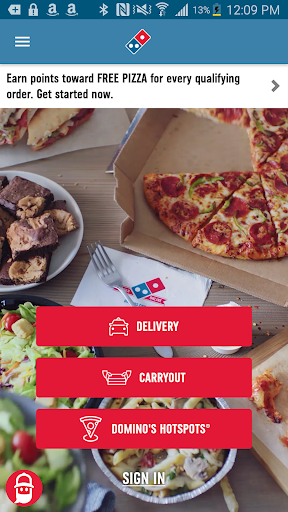
Domino's Pizza USA brings the world's favorite pizza chain directly to your smartphone, transforming the way you order, customize, and enjoy your meals. Whether you crave a classic pepperoni, a loaded meat feast, or a plant-based option, this official app serves as your all-in-one companion for a seamless pizza experience. With a few taps, you can browse the full menu, create your perfect pizza with an endless array of toppings and crusts, and even track your order in real time from the oven to your doorstep. But it’s more than just pizza—Domino's Pizza USA also offers side dishes like cheesy bread, pasta bowls, boneless chicken, desserts, and drinks, making it a complete solution for any craving. The app is designed to save you time with saved favorites, one-tap reordering, and exclusive mobile-only offers. Its intuitive interface means you can place an order in under a minute, even when you're on the go. With the Domino's Pizza USA app, you're always just a few taps away from hot, fresh, and delicious delivery or carryout.
Key Features
- Real-Time Order Tracking: Watch your pizza journey from the moment it enters the oven until it leaves for delivery. The Domino's Pizza Tracker™ provides live updates, so you know exactly when to expect your hot meal.
- Easy Customization & Build Your Own Pizza: Choose from a wide range of crusts (Hand Tossed, Thin Crust, Brooklyn Style, Gluten-Free, and more), sauces (Classic Tomato, Robust Inspired Tomato, Alfredo, BBQ), and over 30 toppings. Adjust portions, select half-and-half options, or create a completely unique masterpiece.
- Exclusive Mobile Deals & Coupons: Get access to app-only promotions, special combo offers, and digital coupons that aren't available in-store or on the website. Save money on every order with just a tap.
- One-Tap Reordering: Save your favorite orders (up to five) and reorder them with a single click. Perfect for your go-to Friday night pizza or a quick lunch delivery.
- Domino's Rewards Program: Earn points on every qualifying purchase. Collect enough points to unlock free pizzas, sides, and other rewards. Check your balance and redeem rewards directly in the app.
- Multiple Payment Options: Pay securely with credit/debit cards, PayPal, Google Pay, or cash at the door. You can also split payment between multiple methods.
- Store Locator & Contactless Delivery: Find the nearest Domino's store, check hours, and choose between delivery (with contactless options) or carryout. Set delivery instructions and even get notified when a driver is nearby.
Why Choose Domino's Pizza USA App?
With countless food delivery apps available, Domino's Pizza USA stands out because it is built specifically around the brand you trust, offering a level of integration and reliability that third-party apps simply can't match. The app is designed to minimize friction: you can save your address, payment details, and favorite orders, which means reordering takes less than 10 seconds. No more fumbling for a credit card or typing in your address every time. Furthermore, the exclusive mobile deals often provide better value than what you'd find elsewhere. The Domino's Points rewards system is straightforward—order, earn points, get free food—and the app makes it easy to track your progress. Another standout is the Domino's Pizza Tracker, which adds a fun, transparent layer to the ordering process; you see exactly when your pizza is being prepped, baked, boxed, and handed to the driver. For those who value speed and consistency, the app also supports Domino's"Piece of the Pie Rewards"and the"Delivery Insurance"option, ensuring that if something goes wrong, you're made whole. The user interface is clean and modern, with large buttons and clear menus that work well on all screen sizes, including tablets. And if you ever need help, the app offers live chat and a comprehensive FAQ. It’s no wonder Domino's is consistently recognized for digital innovation in the quick-service restaurant industry.
How to Use the Domino's Pizza USA App
Getting started is simple. Download the app from the Google Play Store and open it. You'll be greeted with the option to sign in using your existing Domino's account or create a new one. If you're new, just enter your name, email, phone number, and a password. Once logged in, the app asks for your location to show nearby stores. You can either allow location services or manually enter a zip code or address. Then you're ready to order: tap"Order Now"and choose between delivery or carryout. You can browse the full menu—pizzas, sandwiches, pasta, chicken, sides, desserts, and drinks. If you want to create your own pizza, tap the"Build Your Own"option. Select your crust size (Small, Medium, Large, Extra Large), your crust type, sauce, cheese amount (light, normal, extra), and toppings—each topping has a small price addition, so you can see the total update in real time. You can also add specialty pizzas like the Pacific Veggie or the Buffalo Chicken. Before checking out, you can apply any coupon codes or choose from the"Deals"tab that shows current offers. Then select your payment method and place the order. The order tracking page opens automatically. You'll also receive notifications at each stage. For future orders, just use the"Favorites"tab to reorder your last or saved order.
Tips and Tricks for the Best Experience
To get the most out of the Domino's Pizza USA app, consider a few insider tips. First, always check the"Deals"section before ordering—you might find a 50% off pizza special or an extra large three-topping for a fixed price. Stacking a coupon with your Rewards points can yield even more savings. Second, set up your"Favorites"list early. After you order a pizza you love, save it to favorites with a custom name. That way, next time you're craving that exact combo, you can order it in two taps. Third, take advantage of the"Pizza Tracker"to plan your meal timing. If you’re ordering for a party, you can see exactly when each item is being prepared, ensuring everything arrives hot together. Fourth, use the"Delivery Instructions"field to ensure your order arrives just where you want it—for example,"Leave at the front door, ring bell"or"Meet at the back gate."Many users appreciate the contactless delivery option for added safety. Fifth, enroll in the Domino's Rewards program (it's free) and keep an eye on your points balance. You can also set the app to notify you when you're close to earning a free pizza. Finally, if you're ordering for a large group, use the"Multi-Item"feature to send separate items to different locations—though note this is only available in certain areas. And if something goes wrong, use the app's"Help"feature to chat with customer support or request a reorder or refund. With these tips, you’ll become a Domino's power user in no time.
In summary, the Domino's Pizza USA app is a robust, user-friendly tool that puts the entire Domino's experience in your pocket. From exclusive deals and easy customization to real-time tracking and a rewarding loyalty program, it’s designed to make ordering pizza as effortless as possible. Whether you’re feeding a family, hosting a game night, or just treating yourself after a long day, this app ensures your favorite meal arrives hot, fresh, and exactly as you envisioned. Download it today and taste the convenience of smart pizza ordering.