| Title | Fly Delta |
| Version | 5.27.2 |
| Price | Free |
| Category | Common |
| Package | com.delta.mobile.android |
Traveling can be a complex orchestration of flights, layovers, baggage, and time zones, but the Fly Delta app transforms that experience into a seamless, intuitive journey from booking to arrival. Whether you are a frequent business flyer navigating a tight schedule or a leisure traveler embarking on a long-awaited vacation, this official mobile companion puts the power of Delta Air Lines right in your pocket. With Fly Delta, you gain real-time access to your itinerary, digital boarding passes, flight status updates, and personalized travel tools—all designed to reduce stress and enhance your time in the air. The app goes beyond simple check-in, offering features that let you manage seat selections, track checked bags, and even rebook flights if disruptions occur. It is not just an accessory to your travel plans; it is an indispensable command center that adapts to your needs before, during, and after every flight. By centralizing essential travel information and delivering proactive alerts, Fly Delta helps you move through airports and time zones with confidence. From the moment you open the app, you will appreciate the clean design and logical navigation that put critical details front and center. No more fumbling through emails or waiting in line at kiosks—every flight update, gate change, and upgrade opportunity is just a tap away. For anyone who flies with Delta, this app is the golden key to a smoother, more connected travel experience.
Key Features
- Real‑Time Flight Status and Alerts – Stay informed with up‑to‑the‑minute updates on departure and arrival times, gate assignments, and boarding phases. The app sends proactive notifications for schedule changes, cancellations, or gate swaps, so you are always ahead of the curve.
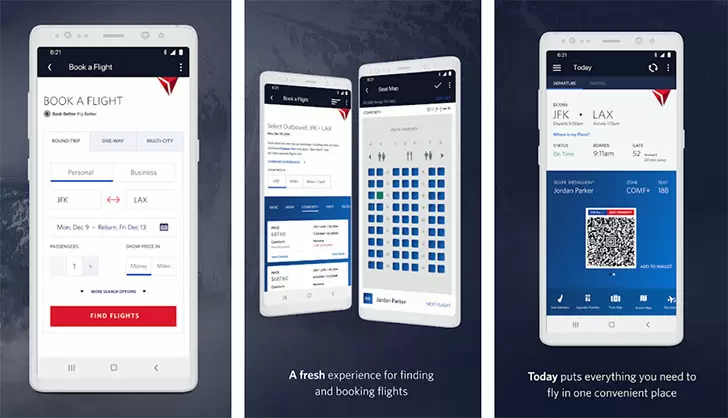
- Digital Boarding Pass and Check‑In – Check in for your flight up to 24 hours in advance and store your boarding pass directly in the app. A scannable barcode means no more paper tickets or lost documents—just show your phone at the gate.
- Integrated Trip Management – View all your upcoming and past Delta trips in one unified timeline. Easily access flight details, rental car reservations, hotel bookings, and even your SkyMiles account without hopping between different services.
- Seat Selection and Upgrades – Change or choose your seat at any point during your journey, from booking to boarding. The app also lets you request upgrades to Delta Comfort+ or First Class and see available upgrading options using miles or cash.
- Baggage Tracking – Attach a digital tag to your checked luggage and follow its journey from check‑in to carousel. The app sends updates when your bag is loaded, transferred, and ready for pickup, offering peace of mind every step of the way.
- SkyMiles Account Dashboard – Monitor your miles balance, view recent activity, and explore ways to earn or redeem points. The app also highlights exclusive partner offers and mileage boosters tailored to your travel habits.
- Airport Maps and Wayfinding – Navigate over 300 airports worldwide with interactive terminal maps that show gates, lounges, restaurants, and amenities. Find the nearest restroom, power outlet, or Starbucks without wandering around.
Why Choose Fly Delta for Your Travels
When you are jetting across the country or around the globe, having a reliable travel companion can make all the difference. Fly Delta stands out because it is built by Delta Air Lines itself, meaning every feature is designed with the airline’s operations, policies, and customer experience in mind. Unlike third‑party travel aggregators, the app pulls data directly from Delta’s systems, ensuring that the flight status you see is exactly what the crew and gate agents have. This accuracy translates into fewer surprises and smoother transitions between connections. Furthermore, the app’s integration with your SkyMiles account means that every action you take—whether checking in, upgrading your seat, or booking a new flight—automatically links to your loyalty profile. You never have to manually enter your frequent flyer number or worry about missing out on miles for a flight you booked through a different channel.
Another compelling reason to choose Fly Delta is its emphasis on proactive assistance during travel disruptions. If your flight is delayed or cancelled, the app will not only notify you immediately but also offer automated rebooking options. You can view alternate flights, compare departure times, and confirm a new itinerary without waiting in a customer service line. For business travelers on tight schedules, this capability can save hours of frustration and get you to your destination with minimal downtime. The app also includes a dedicated “Same‑Day Change” feature that lets you switch to an earlier or later flight on the same route, often without additional fees if you are a SkyMiles member. All these tools work together to give you a sense of control even when travel plans go sideways.
Tips and Tricks for Getting the Most Out of Fly Delta
To truly unlock the app’s potential, start by enabling push notifications for your flights. While it might seem obvious, many travelers forget to grant notification permissions, missing crucial updates about gate changes or boarding times. Once notifications are active, you can also customize which alerts you want to receive—for example, only those related to delays or cancellations, if you prefer less clutter. Another smart move is to store your frequent flyer number and passport information in the app’s profile settings. This pre‑filled data accelerates the check‑in process and ensures your documents are always ready for international travel. If you are a frequent flyer, take advantage of the “My Trips” view to star your most important journeys; the app will then pin them to the top of your list for quick access.
For those who like to plan ahead, explore the “Flight Search” feature beyond just booking tickets. You can use it to compare different departure times, view fare rules, and even set price alerts for specific routes. The app’s integrated calendar view lets you see your entire month’s travel at a glance, helping you manage overlapping trips and choose flights that best fit your schedule. And don’t overlook the “Airport Info” section: before you leave for the airport, check the real‑time security wait times, parking availability, and dining options. This pre‑flight intelligence can help you decide when to head to the airport and whether to grab a meal before boarding or wait until you are through security. Finally, if you are flying with a group or family, the app allows you to link multiple reservations under a single trip view—perfect for ensuring everyone is on the same plane and at the same gate.
Fly Delta is more than a mobile boarding pass; it is a fully integrated travel command center that gives you the tools to navigate the complexities of modern air travel with ease. By leveraging real‑time data, personalized alerts, and a user‑friendly interface, the app reduces anxiety and increases efficiency from the moment you book to the moment you land. Whether you are managing a single cross‑country trip or a multi‑leg international journey, having Fly Delta on your device means you are never more than a tap away from your itinerary, your miles, and your peace of mind. Download the app today and start flying smarter—because every minute saved in the airport is a minute better spent at your destination.