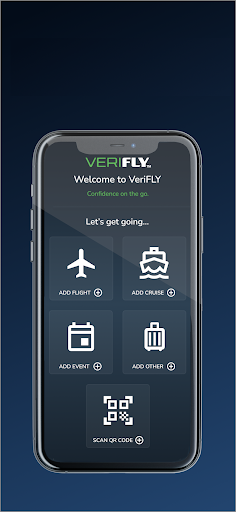
| Title | VeriFLY: Fast Digital Identity |
| Version | 1.5.1.5 |
| Price | Free |
| Category | Common |
| Package | com.daon.glide.person.android |
Traveling today requires more than just a passport and a smile. Between health declarations, digital boarding passes, and identity checks, the process can quickly become overwhelming. VeriFLY: Fast Digital Identity is designed to cut through the chaos by giving you a single, secure digital credential that streamlines every step of your journey. Whether you’re flying domestically or internationally, checking into a hotel, or accessing a venue, VeriFLY puts your verified identity right in your pocket. Developed by IdentityX, a leader in biometric and identity solutions, this app replaces stacks of documents with one encrypted, tamper‑proof profile. No more juggling multiple apps, no more repeating the same information at every counter. Just a quick scan of your device and you’re on your way. With VeriFLY, your identity becomes the key to a friction‑free travel experience.
Key Features
- Biometric Enrollment & Verification – Register your face or fingerprint to create a unique digital identity that only you can unlock. The app uses advanced liveness detection to ensure you’re a real person, not a photograph or video.
- One‑Tap Credential Sharing – Share your verified identity and travel documents (passport, vaccination records, test results) with airlines, hotels, and border control using a simple QR code or NFC tap. No need to hand over your phone or fill out paper forms.
- Real‑Time Status Updates – Get instant notifications when your documents are approved, when a check‑in is available, or when your identity has been verified at a gate. Stay informed without constantly refreshing screens.
- Multi‑Document Storage – Store your passport, driver’s license, boarding passes, health certificates, and even hotel reservations in one secure digital wallet. Everything is encrypted end‑to‑end and accessible only with your biometric approval.
- Offline Access Mode – VeriFLY works even when you’re offline or have limited connectivity. Your verified credentials are stored locally on your device, so you can present them at any checkpoint without relying on cellular or Wi‑Fi signals.
- Privacy‑First Architecture – Your data never leaves your device without your explicit consent. VeriFLY uses zero‑knowledge encryption and follows global privacy regulations (GDPR, CCPA). No central database holds your personal information—only you control access.
- Compatibility with Major Airlines & Venues – The app is already integrated with over 40 airlines, major hotel chains, and event organizers. From check‑in to boarding to hotel check‑in, VeriFLY works seamlessly with their verification systems, reducing wait times and human error.
Why Choose VeriFLY Over Traditional Travel Documents?
Traditional travel identity relies on plastic cards, paper documents, and manual checks that are slow, error‑prone, and vulnerable to fraud. VeriFLY eliminates these pain points by digitizing your identity in a way that is both secure and convenient. Unlike other digital wallet apps that only store copies of documents, VeriFLY performs real‑time verification against trusted sources. For example, when you upload your passport, the app cross‑references it with government databases (where permitted) to ensure it’s valid and not expired. This means that when you present your VeriFLY credential, the receiving system already trusts its authenticity.
Another key advantage is the elimination of repetitive identity checks. Once you’ve verified your identity with one airline, you can reuse that same verified credential for future flights with the same or partner airlines without re‑uploading documents. This saves precious time, especially for frequent travelers who might fly multiple times a month. Moreover, VeriFLY’s biometric locking ensures that even if your device is lost or stolen, no one else can use your digital identity without your face or fingerprint. And because your data is stored locally, there is no central honeypot for hackers to target.
How to Use VeriFLY: A Simple Step‑by‑Step Guide
Getting started with VeriFLY takes less than five minutes. First, download the app from the Google Play Store and create an account using your email or phone number. The app will guide you through capturing a short video selfie and scanning the chip of your passport (if your passport has an embedded NFC chip) or manually entering details. This initial enrollment creates your unique digital identity token. Next, you can add supporting documents like vaccination records or negative test results by scanning their QR codes or uploading PDFs. The app will verify these documents against official sources and store them securely.
Once your profile is ready, you can use VeriFLY at any participating checkpoint. Simply open the app, authenticate with your face or fingerprint, and choose which credentials to share. At a boarding gate, hold your phone near the reader or show the QR code displayed on screen. The airline agent will see your verified identity and documents instantly, without needing to touch your device. For hotel check‑ins, you can share your ID and reservation together in one tap. The entire process is designed to be fast, contactless, and respectful of your privacy.
Tips and Tricks for Getting the Most Out of VeriFLY
To ensure a smooth experience, keep your app updated to the latest version from the Play Store—each update often brings support for new airlines, better performance, and enhanced security features. Before a trip, pre‑load any required health documents at least 48 hours in advance to allow time for verification. If you’re traveling with family, each member over the age of six can have their own profile; parents can manage dependent profiles for younger children from their own device. Also, enable notifications so you’re alerted if any of your documents are about to expire or have been updated by a trusted source.
Another useful tip: if you frequently travel to countries that require specific health declarations (like vaccination certificates), add those documents to VeriFLY even if they aren’t mandatory for your upcoming trip. The app will store them for future use. And remember, because VeriFLY works offline, you don’t need to worry about roaming data or spotty Wi‑Fi at airports. Just make sure you’ve authenticated your identity before you lose signal—you can then present your credentials anywhere, anytime.
Security and Trust: Your Data, Your Control
IdentityX has built VeriFLY with a “privacy by design” philosophy. All biometric data (your face template and fingerprint minutiae) never leave your device—they are stored in a secure enclave and never transmitted to any server. The documents you upload are encrypted with a key only you hold, derived from your biometrics and a device‑specific secret. Even if someone intercepts the data in transit, they cannot decrypt it. VeriFLY also undergoes regular third‑party security audits and is compliant with the highest industry standards, including SOC 2 Type II and ISO 27001. You retain full control over what you share, with whom, and for how long. And you can revoke access at any time, instantly making your digital identity invalid for future uses.
In a world where speed and security often seem at odds, VeriFLY proves you can have both. Whether you’re a business traveler racing through airports, a family juggling multiple itineraries, or a digital nomad hopping between countries, VeriFLY gives you back precious minutes and peace of mind. It’s not just an app—it’s your digital passport to a simpler, safer travel experience. Download VeriFLY today and discover what it feels like to travel with confidence, knowing your identity is always verified, always secure, and always ready to go.