| Title | BBC Sounds: Radio & Podcasts |
| Version | 2.10.0.17558 |
| Price | Free |
| Category | Common |
| Package | com.bbc.sounds |
BBC Sounds is your all-access pass to the incredible audio universe of the British Broadcasting Corporation. More than just a radio app, it brings together live radio stations, thousands of on-demand programs, curated podcasts, music mixes, and audio documentaries – all in one seamless experience. Whether you're a devoted fan of BBC Radio 1, Radio 2, Radio 4, or Radio 6 Music, or you're looking for deep-dive podcasts on history, science, arts, and comedy, BBC Sounds serves as your personal audio companion. The app intelligently learns your tastes, recommends new shows, and lets you build a custom listening queue that follows you across devices. With offline downloads, sleep timers, and a beautifully simple interface, BBC Sounds transforms your commute, workout, or downtime into a journey of rich, diverse audio.
Key Features
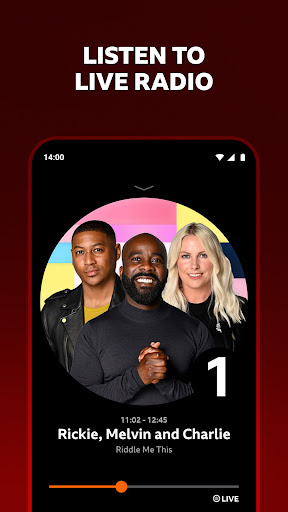
- Live Radio Streaming – Tune in to more than 40 BBC radio stations live, including national stations like BBC Radio 1, 2, 3, 4, 5 Live, and the world-famous BBC World Service. You can also access local and regional stations to stay connected with your area.
- On-Demand Catch-Up – Missed a show? No problem. BBC Sounds lets you listen to hundreds of thousands of past episodes from the last 30 days (and many older archive gems). Pause, rewind, and continue from where you left off.
- Curated Podcasts & Playlists – Dive into an ever-growing library of original BBC podcasts covering everything from true crime to philosophy. Plus, enjoy expertly crafted music mixes and themed playlists that adapt to your mood.
- Personalized Recommendations – The app learns your listening habits to suggest new shows, episodes, and collections you’ll love. Your “For You” feed becomes smarter the more you listen.
- Offline Downloads – Download your favorite episodes, podcasts, and music mixes over Wi-Fi to listen later without using mobile data. Perfect for planes, trains, or areas with patchy connectivity.
- Sleep Timer & Background Play – Set a sleep timer to automatically stop playback after a set duration. Continue listening in the background while using other apps, with minimal battery drain.
- Multi-Device Syncing – Your listening progress, downloads, and queue sync seamlessly across your phone, tablet, and even your computer via the BBC Sounds web player. Pick up right where you left off.
Why Choose BBC Sounds?
BBC Sounds stands apart from other audio apps because it is built around the ethos of public service broadcasting: quality, trust, and discovery. Unlike algorithmic playlists that trap you in a bubble, BBC Sounds exposes you to a wide range of voices, topics, and genres – from in-depth news analysis on Radio 4’s “Today” program to uplifting dance mixes on Radio 1’s “Essential Mix.” Every piece of content is curated by expert editors, ensuring you get not just entertainment, but also education and inspiration. The app is ad-free for UK users, and even internationally, you can access a generous amount of content free of charge (some live sports and music may be georestricted). The interface is clean, intuitive, and designed for long listening sessions – no clutter, no distractions.
Another compelling reason to choose BBC Sounds is its integration with the BBC’s wider ecosystem. You can listen to the same program across your smart speaker, TV, or car via Apple CarPlay and Android Auto. The app also supports Chromecast, allowing you to stream audio to your home speakers. For families, there’s a dedicated CBeebies and CBBC section with safe, age-appropriate content for children. And if you’re a music lover, the “Music” tab offers hundreds of mixes and live sessions from festivals like Glastonbury, Reading, and the Proms. BBC Sounds is truly a one-stop shop for anyone who values intelligent, varied, and entertaining audio.
How to Use BBC Sounds
Getting started is as simple as downloading the app and creating a free BBC account. If you already have a BBC ID (for BBC iPlayer or BBC News), you can sign in directly. Once inside, you’ll land on the “Home” tab, which shows a mix of live stations, trending podcasts, and recommendations based on your interests. You can tap on any station to start live listening, or browse the “Podcasts” and “Music” tabs to find something on demand.
To build a personalized listening queue, simply tap the “+” icon on any episode or track – it will be added to your “My List” area. You can reorder items, mark them as played, or remove them. For offline listening, tap the download button (a downward arrow) on any episode or mix; downloads appear in a separate “Downloads” tab. The app also lets you search by keyword, genre, or presenter, making it easy to rediscover old favorites like “Desert Island Discs” or “The Archers.”
Advanced features include the ability to adjust playback speed (0.5x to 2x), set a sleep timer from the player screen, and enable “Skip Silence” for podcasts to automatically trim quiet pauses. If you use a smart assistant like Alexa or Google Assistant, you can link your BBC Sounds account to play stations or podcasts via voice commands. The experience is designed to be frictionless – just press play and let BBC Sounds enrich your day.
Tips and Tricks for a Better Experience
To truly master BBC Sounds, here are a few insider tips. First, always connect to Wi-Fi when downloading large collections – you can set the app to download only over Wi-Fi in the settings to avoid data charges. Second, explore the “Trending” and “New & Noteworthy” sections regularly; the BBC frequently releases limited series and seasonal content that disappears after a few weeks. Third, if you’re a podcast binge-lister, use the “Mark as Played” feature to keep your queue tidy. Fourth, enable notifications for your favorite shows so you never miss a new episode. Fifth, try the “Sleep Timer” for bedtime – it not only saves battery but also ensures you don’t miss the ending of a gripping documentary. Finally, don’t forget to rate and review episodes – your feedback helps the BBC Sounds team improve recommendations for everyone.
Whether you’re commuting, cooking, exercising, or relaxing, BBC Sounds is the perfect audio companion. It combines the trust and quality of the BBC with the convenience of modern app design. With thousands of hours of content at your fingertips, you’ll never run out of things to listen to. Download BBC Sounds today and start exploring a world of sound that informs, entertains, and inspires.