| Title | MLB |
| Version | Varies with device |
| Price | Free |
| Category | Common |
| Package | com.bamnetworks.mobile.android.gameday.atbat |
Step up to the plate and never miss a moment of America’s favorite pastime with the official MLB app. Whether you’re a die-hard fan who follows every pitch, a fantasy baseball manager looking for real-time stats, or a casual viewer catching the evening highlights, this app delivers a comprehensive, all-in-one baseball experience right on your Android device. Developed by MLB Advanced Media, L.P., the app is the definitive companion for the season, offering live streaming of games (subject to regional blackout restrictions), up-to-the-second scores, breaking news, exclusive video content, in-depth statistics, and much more. From Spring Training to the World Series, the MLB app puts the entire league in your pocket, letting you track your favorite teams and players with unmatched depth and speed. With a clean, intuitive interface and customizable notifications, you can tailor your feed to focus on what matters most to you. Whether you’re at the stadium, on the go, or relaxing at home, the official MLB app ensures you stay connected to every home run, strikeout, and game-changing play. It’s more than just a scoreboard – it’s your personal ticket to the heart of baseball.
Key Features
- Live Game Tracking & Real‑Time Scores – Follow every game with pitch‑by‑pitch updates, live box scores, and a dynamic scoreboard that refreshes instantly. Never wonder what’s happening on the field, no matter where you are.
- Streaming Video & Audio – Watch live out‑of‑market games with an MLB.TV subscription, listen to home and away radio broadcasts, and enjoy a library of on‑demand highlights, recaps, and original shows. (Blackout restrictions apply.)
- Breaking News & In‑Depth Analysis – Get push notifications for trade deadlines, injury reports, roster moves, and other major league news. Access articles from MLB.com’s editorial team, plus exclusive video analysis from experts.
- Comprehensive Player & Team Stats – Dive into detailed statistics for every player and team, including traditional numbers (batting average, ERA) and advanced metrics (wOBA, FIP, exit velocity, launch angle). Sort and compare to satisfy your fantasy or analytical needs.
- Customizable Alerts & Favorites – Set alerts for specific teams, players, or game situations (e.g., when your team scores, when a player comes to bat). Choose the types of notifications that matter to you and keep distractions to a minimum.
- Interactive Standings & Schedule – View divisional and league standings updated in real time, browse the full season schedule, and quickly check future matchups. The app even syncs with your calendar so you never miss first pitch.
- Fantasy Baseball Integration – Manage your fantasy team on the go with live scoring, player news, and performance trends. The MLB app pulls in relevant fantasy insights, helping you make informed lineup decisions.
Why Choose the Official MLB App
There are many sports apps out there, but only the official MLB app offers the direct, authorized connection to Major League Baseball. This means you get the most reliable data, the fastest updates, and the broadest access to exclusive content that simply isn’t available elsewhere. Because it’s built by MLB Advanced Media, the same team behind MLB.com and MLB Network, you can trust that the scores, stats, and news are accurate and timely. No third‑party aggregators, no guesswork – just pure, official baseball information.
The app is designed to be inclusive for all types of fans. If you only want to check tomorrow’s starting pitcher, you can do that in two taps. If you’re a stats nerd who wants to study exit velocity splits, you have that data at your fingertips. The interface adapts to your usage, remembering your favorite team so your home screen always shows relevant content. Plus, the video and audio streaming quality is top‑notch, with adaptive bitrate technology that works well even on slower connections. And with the option to sync across devices – tablet, phone, and even your smart TV via Cast – you can start watching on your phone at the ballpark and continue on your big screen at home.
How to Use the MLB App
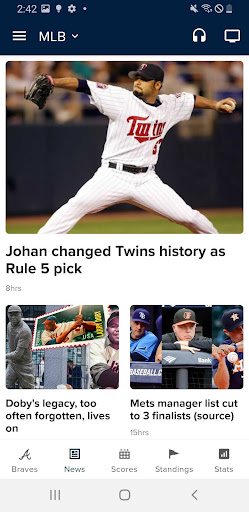
Getting started is simple. Download the app from the Google Play Store, open it, and choose your favorite team (or teams) during the setup process. The app will immediately personalize your feed with that team’s latest news, scores, and schedule. You can toggle between the “For You” tab – which curates content based on your preferences – and the “MLB” tab, which shows league‑wide headlines, top plays, and trending stories.
To follow a live game, tap the game on the scoreboard to open a rich game detail page. Here you’ll see the current score, inning, count, and a play‑by‑play feed. Swipe left to see the box score, and tap the video icon to watch live streams (if subscribed) or a highlight reel. You can also listen to the radio broadcast by tapping the headphone icon – perfect for keeping up during a commute. Use the “Watch & Listen” section in the main menu to browse upcoming broadcasts and set reminders.
For deep dives, use the “Stats” and “Players” tabs to compare batters and pitchers across the league. You can filter by season, month, or even individual games. The “Standings” tab shows playoff races with magic numbers and elimination scenarios. And don’t forget to customize your notifications from the settings menu – choose from “Game Start,” “Half Inning,” “Home Run,” “Final Score,” and many more. The app learns your habits over time: if you always watch instant replays after a homer, it will suggest them sooner.
Tips and Tricks for a Better Experience
Maximize your MLB app usage with a few insider tips. First, enable “At Bat” mode if you’re a fan of watching the game while doing other things – this keeps the screen awake and highlights a live pitch‑by‑pitch feed. Second, use the “Follow Player” feature to get notifications when a specific player is in the lineup, gets a hit, or strikes out. This is especially useful for fantasy owners or fans of a particular star.
If you’re at the ballpark, turn on location services to unlock “Stadium Mode.” This provides venue‑specific content, like concession maps, parking information, and in‑stadium promotions. You can also use the app to access your digital tickets (if you’ve purchased them through MLB.com) and never fumble with paper again. For those with an MLB.TV subscription, remember that you can watch up to four games simultaneously on the same device using the multi‑game view tool (tablet recommended). Finally, download content for offline viewing – some highlight reels and recap shows can be saved to your device if you have a data‑sensitive plan.
Another great feature is the “Baseball IQ” trivia and quizzes that occasionally appear in the app – test your knowledge against friends and earn virtual rewards. And don’t forget to sync your MLB account across devices so your favorites, watch history, and subscription follow you everywhere. With regular updates throughout the season – including new statistics, improved video players, and bug fixes – the app keeps getting better. The development team is responsive to user feedback, so if you have a suggestion, use the “Send Feedback” option in the settings.
In short, the MLB app is the ultimate digital companion for baseball fans. It delivers comprehensive coverage, reliable data, and a host of features that enhance every aspect of following the game. Whether you’re a casual observer or a hardcore statistician, you’ll find everything you need in one polished, easy‑to‑use package. Download it today and experience every pitch, hit, and win like never before.