| Title | Amazon Fire TV |
| Version | 2.1.3057.0-aosp |
| Price | Free |
| Category | Common |
| Package | com.amazon.storm.lightning.client.aosp |
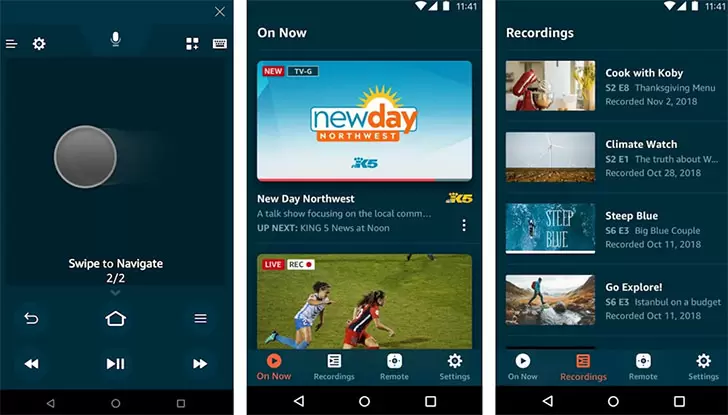
The Amazon Fire TV app transforms your Android phone or tablet into a powerful, intuitive remote control and second-screen companion for your Fire TV, Fire TV Stick, and Fire TV Edition smart TVs. Gone are the days of frantically searching between couch cushions for a misplaced remote or struggling to type out long passwords with an on-screen keyboard. This seamless tool from Amazon puts complete command over your streaming experience right in the palm of your hand. Whether you’re browsing a vast library of movies and shows, launching apps like Netflix and Prime Video, or quickly entering search terms using your device’s familiar keyboard, the app makes navigation faster, quieter, and far more enjoyable. It connects effortlessly to your Fire TV via your home Wi‑Fi network, eliminating the need for extra hardware or direct line-of-sight. Beyond simple directional controls, you gain access to voice search with Alexa, a full QWERTY keyboard for text input, and quick-launch shortcuts for your favorite content. The interface is clean, responsive, and designed to mirror the simplicity of a physical remote while adding a layer of convenience that only a touchscreen can provide. For anyone seeking to streamline their home entertainment setup or replace a lost remote, the Amazon Fire TV app is an essential, free download that enhances the way you interact with your television every single day.
Key Features
- Simple, Responsive Navigation Control – The app replicates the familiar directional pad, select button, and playback controls of your physical Fire TV remote. Swipe or tap to move through menus, select content, pause, rewind, or fast-forward with minimal lag. The large touch area ensures precise control, reducing accidental clicks. You can also access the home, back, and menu buttons instantly, giving you full command over the Fire TV interface without ever needing the dedicated hardware.
- Built-in Alexa Voice Search – Tap the microphone button and speak naturally to search across hundreds of apps and channels. Ask for specific movie titles, genres, actors, or even launch apps with your voice. Alexa quickly understands commands like “open Hulu,” “find comedies,” or “play jazz music,” making content discovery nearly instantaneous. This feature turns your phone into a voice assistant that understands the full power of Alexa, providing hands-free convenience when you want to find something without typing.
- Full QWERTY Keyboard for Text Entry – One of the most frustrating aspects of any streaming device is typing with an on-screen keypad using a directional remote. The Fire TV app eliminates this pain completely. As soon as a text field appears on your TV, the app automatically presents a keyboard on your phone’s screen. Type passwords, search queries, and web addresses with the speed and accuracy you’re used to on any messaging app. This feature alone saves enormous time and frustration during setup or when logging into subscription services.
- Quick Access to Your Apps and Games – The main screen of the remote app displays a customizable list of your installed Fire TV applications. Launch Netflix, Disney+, YouTube, or any other service with a single tap, bypassing the main Fire TV menu entirely. This acts as a personalized launchpad, letting you jump directly into your favorite entertainment. The layout also makes it effortless to switch between apps without returning to the home screen every time, so you spend less time browsing and more time watching.
- Playback and Media Controls at Your Fingertips – Beyond basic navigation, the app provides dedicated transport controls. You get play/pause, rewind, fast-forward, and skip buttons that are always visible, making it perfect for controlling music, podcasts, or video content. The controls work universally with any media app on your Fire TV, so whether you’re listening to Spotify or binging a series, the experience remains consistent and immediate.
- Seamless Wi‑Fi Pairing and Device Discovery – Connecting the app to your Fire TV takes just a few seconds. Simply ensure your phone and Fire TV are on the same Wi‑Fi network, open the app, and it automatically detects your device. You can then pair by entering a short code displayed on your TV. Once paired, the connection is remembered, and reconnection is automatic whenever you launch the app. No Bluetooth setup, no accessories—just a direct, low-latency link over your home network.
- Wake Screen and TV Control Options – The app can wake your Fire TV from sleep mode, so you don’t need to find the physical remote just to turn the system on. Additionally, if you have a Fire TV Edition television or a Fire TV device with equipment control capabilities, you can use the app to adjust volume, mute, and power on/off compatible TVs and soundbars, consolidating multiple controls into one intuitive interface.
Why Choose the Amazon Fire TV Remote App?
Reliability and simplicity sit at the heart of this tool. While third‑party remote apps exist, none offer the deep integration and zero‑setup philosophy of Amazon’s own official solution. The app is engineered to deliver a lag‑free experience, with commands registering on your TV almost instantly. It also respects your privacy and data usage in the same way all Amazon services do, and it receives regular updates that ensure compatibility with the latest Fire TV models and software features. For families, this app is a game‑changer: multiple phones can be paired to a single Fire TV, so everyone in the household can have their own remote. That means no more arguments over who holds the clicker during movie night—anyone with a smartphone can contribute to the queue or search for content independently. The keyboard integration is particularly valuable for those who use their Fire TV for browsing the web or entering login credentials across numerous streaming platforms. Instead of tediously clicking from letter to letter, you can simply type naturally and move on. Another standout advantage is the voice search capability. While many Fire TV remotes include a microphone, having it on your phone means you can speak to Alexa even when the TV is in another room or when you’ve misplaced the original remote entirely. It extends the range and flexibility of voice commands, making the interface truly frictionless. You’ll also appreciate the app’s lean design—it doesn’t drain battery or consume significant storage, and it stays connected in the background only when needed. Overall, it’s the kind of utility that quickly becomes second nature, and you’ll wonder how you ever tolerated the limitations of the included remote.
Tips and Tricks for the Best Experience
To get the most out of your Fire TV remote app, start by pinning your most‑used apps to the favorites section on the app’s home screen. This creates a speed‑dial effect, letting you launch straight into your evening’s entertainment without navigating menus. If you’re using voice search, phrase your requests clearly and include specifics like “show me action movies from the 90s” or “find episodes of The Office.” Alexa’s natural language processing works best with complete sentences. When typing passwords during initial setup of a service, make sure the keyboard is active on your phone—the app switches to text input mode automatically once the TV cursor enters a text field, but a quick tap on the keyboard icon can force it if needed. For volume control, note that this feature depends on your hardware setup: Fire TV devices connected to TVs or soundbars that support HDMI‑CEC can often be controlled directly, while other configurations may require enabling equipment control settings in the Fire TV menu. Finally, keep the app updated. Amazon frequently adds polish, performance improvements, and new capabilities that keep the experience feeling fresh and responsive.
The Amazon Fire TV remote app is more than just a backup for your physical remote; it’s a complete upgrade to how you interact with your television. Fast text entry, instant voice search, and a customizable launchpad for your apps work together to cut through the clutter and get you watching what you love sooner. Download it today on your Android device and rediscover just how effortless your Fire TV can be.