| Title | BC Services Card |
| Version | 3.1.0 |
| Price | Free |
| Category | Common |
| Package | ca.bc.gov.id.servicescard |
The BC Services Card app is the official digital identity solution from the Province of British Columbia, offering residents a secure and convenient way to carry their BC Services Card right on their Android device. Whether you need to verify your identity for government services, prove your age, or access your personal health information, this app transforms your smartphone into a trusted, touchless ID. Built with industry-leading encryption and biometric protection, it replaces the need to carry your physical card while maintaining the highest standards of privacy and accessibility. From first‑time setup to everyday use, the BC Services Card app simplifies your interactions with provincial services, removing friction and ensuring your information is always under your control.
Key Features
- Digital Card Storage: Securely store a digital version of your BC Services Card, complete with your photo, name, and unique identifier, directly on your phone. The card is always available offline, so you never need an internet connection to display it.
- NFC Tap & Verify: Use your phone’s NFC capability to tap your device at participating government offices, health clinics, and service counters. Instantly share your identity credentials without handing over your physical card or revealing more information than necessary.
- Biometric and PIN Protection: Access your digital card only after fingerprint, face recognition, or a secure PIN. This layered security ensures that even if your device is lost or stolen, your sensitive personal data remains inaccessible to others.
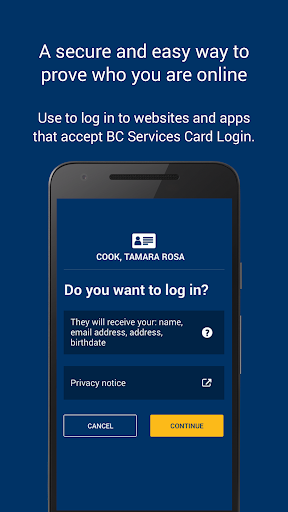
- Seamless Online Login: Pair the app with BC Services Card online login to authenticate yourself on government websites. No more remembering complex passwords — just approve a push notification or scan a QR code to sign in instantly.
- Real‑Time Card Status: Instantly check whether your card is active, suspended, or expired. The app provides clear status indicators and will notify you when it’s time to renew, helping you avoid service interruptions.
- Privacy‑First Design: Your data never leaves your device without your explicit consent. The app uses on‑device encryption and does not track your location or usage. Only the minimum required information is shared during a transaction.
- Accessibility Features: Designed with inclusive principles, the app supports screen readers, high‑contrast modes, and larger text options, making it usable for residents with visual or motor impairments.
Why Choose the BC Services Card App
In a world where identity theft and data breaches are growing concerns, the BC Services Card app gives you peace of mind. Unlike a physical card that can be lost or easily copied, this digital version is protected by your phone’s built‑in security and the province’s robust authentication protocols. Every sharing event is granular — you control exactly what information is transmitted, whether it’s just your age, your photo, or your identity confirmation. The app meets the stringent requirements of British Columbia’s Freedom of Information and Protection of Privacy Act, ensuring provincial‑grade data handling and storage. Moreover, the ability to instantly lock your digital card if your device goes missing adds an extra layer of safety that a plastic card simply cannot offer.
Convenience is at the heart of the experience. Forget rummaging through your wallet or waiting in line because you left your card at home. From checking in at a medical appointment to verifying identity for ICBC services, the app covers it all. The NFC tap feature works in a fraction of a second, reducing wait times and physical contact — a critical advantage in today’s health‑conscious environment. And because the app is issued directly by the Province of British Columbia, you are always using the sole authoritative source for your digital BC Services Card, free from third‑party interference or ambiguous data practices.
How to Use the BC Services Card App
Getting started is straightforward. Download the app from the Google Play Store, then follow the simple on‑screen instructions to set up your digital card. You’ll need your existing physical BC Services Card and the mobile phone number associated with your identity. The app uses a one‑time verification code sent to that number to confirm your identity, after which it will securely retrieve your card details from the provincial registry. Once verified, you can add your preferred unlocking method — fingerprint, face, or PIN — and your digital card will be ready for use instantly. The whole process typically takes less than five minutes.
For everyday use, open the app with your biometrics or PIN and your card will appear. To share your identity at a service counter, simply present the on‑screen card or tap your phone against an NFC reader when prompted. When logging into government websites, select “BC Services Card App” from the login options, scan the provided QR code with the app, and approve the sign‑in. The app will show exactly what information is being requested before you consent. Managing your card is just as easy: tap"Card Details"to view expiry dates, access personalized health resources, or lock your digital card temporarily if you cannot locate your phone.
Tips and Tricks for a Smooth Experience
To get the most out of the app, ensure your phone’s NFC is enabled and that the app is updated to the latest version for the best performance and security. If you ever change your phone number, make sure to update it in the app settings and with your provincial records promptly to avoid verification hiccups. For users who frequently access multiple government services, consider enabling biometric unlock for rapid access — it’s faster than typing a PIN each time. The app’s offline capability is a lifesaver in areas with poor cellular reception, but remember that you will still need an internet connection for the initial setup and for certain online login flows. Keep your device’s operating system current to benefit from the latest Android security patches that further protect your digital identity.
If you have family members who also use the app, note that each person must have their own device linked to their personal phone number; the app does not support multiple identities on one phone for security reasons. Finally, take advantage of the “Help” section within the app, which provides step‑by‑step guides and direct links to provincial support resources should you ever need assistance.
Embrace a smarter way to prove who you are — securely, privately, and without the clutter. The BC Services Card app delivers the strength of government‑backed identity directly to your pocket, making every interaction with British Columbia’s services faster, safer, and entirely in your hands.